You found a client portal you liked, set it up over a weekend and invited your first client. On Monday the banner appeared: "Your trial ends in 6 days." Or the pricing page said the free tier covers five clients, and you have eleven. For a firm of three, adding another monthly subscription before the portal has proved itself is a hard sell, to your partners and to yourself.
Wanting a free client portal is reasonable. Your clients should be able to sign in, see where their work stands and find the latest files without paying anything, and so should you while you find out whether the habit sticks. The catch is that "free" means three different things in this market, and only one of them lasts. Below are eight options that stay free, what each one limits and when you would start paying, checked at the time of writing (October 2026).
Disclosure: I founded Mourinho Solutions, the company behind GoCons. I have tried to be fair, and I say where each tool beats ours.
What "free" should mean for a client portal
Vendors use the word for three different offers:
- A free plan: no end date, with limits on clients, users, projects or storage.
- A free trial: the full product for 7 to 30 days, then a subscription or a lockout.
- Free client seats: your clients sign in at no cost, but only while you pay for a plan.
Only the first one is a free client portal. Having bought consulting and software from the client side, at SISTRADE and later at UNICEF, I know what a client wants to find without asking, so I judged each option on five questions:
- Does it stay free, with no end date?
- Can your clients sign in, and how many of them?
- Does each client see only their own work?
- Is there room for real work: projects or contracts, files and teammates?
- Can you take your data with you if you leave?
Free client portal options at a glance
| Option | Client access on the free plan | Main free limits | You start paying when |
|---|---|---|---|
| GoCons Free | Unlimited client users | 2 team users, 10 active contracts, 1 GB | You need an 11th active contract, a 3rd teammate or more storage |
| Assembly Free | 5 active contacts | 1 internal user, 3 apps | A 6th client contact or a 2nd teammate arrives |
| FuseBase Free | 1 client portal | 1 workspace, 20 AI prompts and 20 automation runs in total | You need a 2nd portal |
| Notion Free | Up to 10 guests | 5 MB per file; block limit once a 2nd member joins | An 11th guest, bigger files or a colleague |
| Google Drive | Anyone you share a folder with | 15 GB shared with Gmail and Photos; no status or billing view | You outgrow 15 GB or need admin controls |
| ClickUp Free Forever | Unlimited guests, always with full edit rights | 60 MB of storage | You need guest permissions or real storage |
| Basecamp Free | Counted within 5 users | 1 project, 1 GB | You have a second client |
| Zoho Projects Free | None (client users are a paid add-on) | 5 users, 3 projects, 5 GB | The first client needs to sign in |
The eight free options, one by one
1. GoCons Free: unlimited client logins, capped by active contracts
GoCons is ours, so read this entry with that in mind. The Free plan costs EUR 0 with no end date, and no card is asked because it never goes through the payment provider. It includes everything the paid plans include on the client side: the contract lifecycle, tasks and milestones, the client portal, documents and folders, and invoice tracking with a billing schedule, billing reminders before each line is due and overdue alerts. The limits are 2 team users, 10 active contracts, 1 GB of storage and 500 MCP calls a month for AI assistants such as Claude. Client users are unlimited and never count.
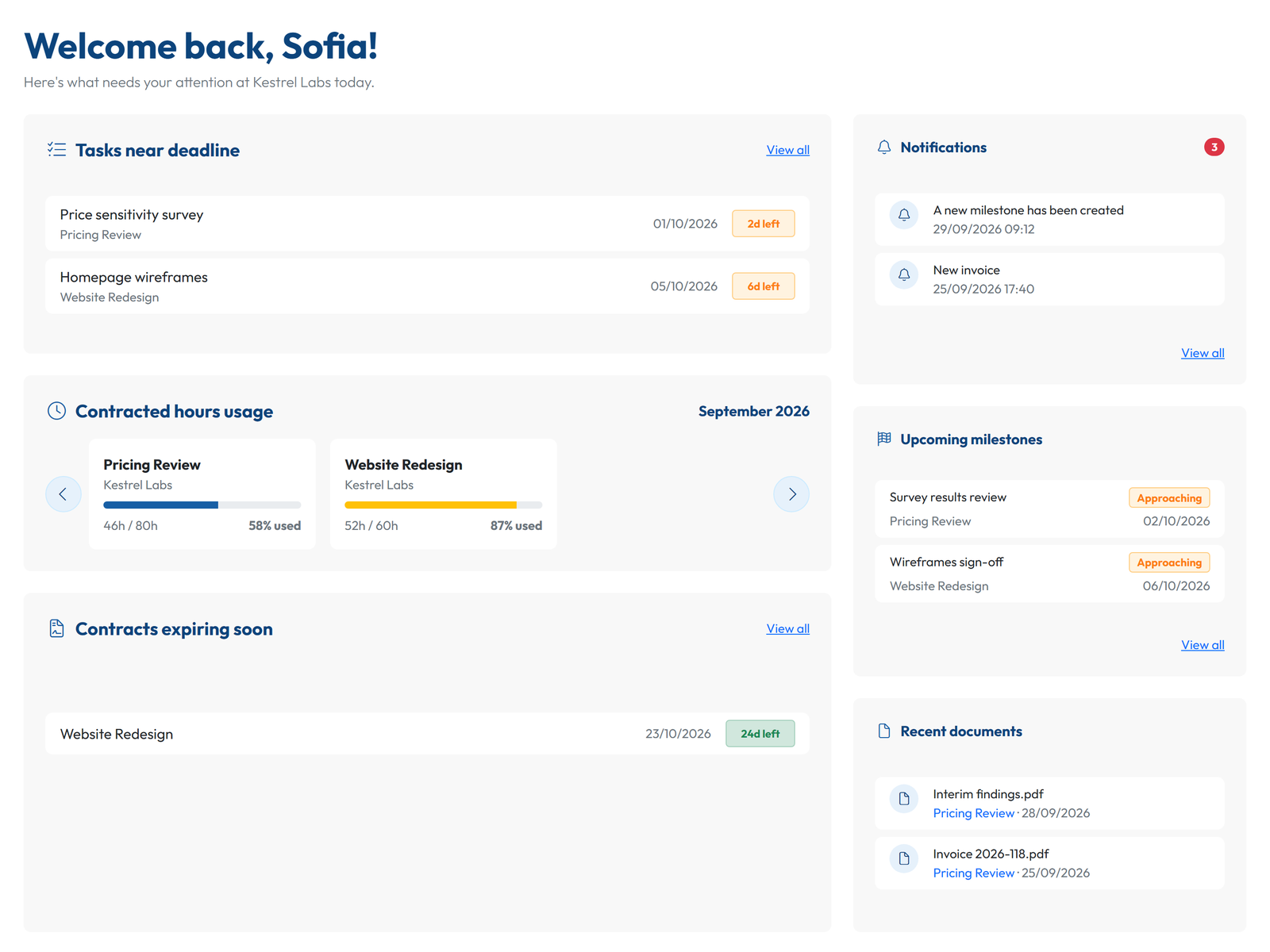
In the client portal, each client sees only their own contracts with you, including hours used against what was contracted and billing amounts and history. The Admin can download all the data, documents included, on Free as on any plan. Free leaves out the REST API, invoice export to QuickBooks or Xero, and Microsoft Entra ID sign-in. And on any plan, GoCons does not issue invoices, take payments, offer chat or e-signatures, or white-label the portal.
You start paying when you need an eleventh active contract, a third teammate or more storage. Silver costs EUR 29 a month (GBP 25, USD 34) at the time of writing, for 10 team users and unlimited contracts (current prices). The free plan suits independent consultants and small firms whose clients mostly ask about progress, hours and invoices.
2. Assembly Free: a branded portal for your first five contacts
Assembly, the client portal formerly called Copilot, has a free-forever plan with 5 active contacts (the client people who can sign in), 1 internal user, 3 apps and 50 monthly credits for its AI app builder [1]. It includes the CRM, the branded client experience, messaging with a team inbox, and billing and payments, with processing fees when you collect money through it.
Where it beats GoCons: messaging with clients and collecting payments, even on the free plan. It is the most polished free portal here, and it is a real plan, not a trial. Five contacts, though, is one or two clients once each brings a sponsor and a finance contact. You start paying when the sixth contact or a second teammate arrives: Starter costs $49 a month ($29 billed yearly) for 50 contacts, still with 1 internal user.
3. FuseBase Free: one portal for a pilot
FuseBase lists a free plan with 1 client portal and 1 workspace with real-time editing and file sharing for up to 20 team members, plus a total of 20 AI prompts and 20 automation runs to try those features [2]. If you start the 14-day trial and add no card, the account drops to this plan instead of closing. Where it beats GoCons: collaborative pages, chat and AI features next to the portal. The pricing page does not say how many client users the free portal allows, so test it with a real client before you rely on it.
You start paying when you need a second portal: Solo costs $39 a month ($32 billed yearly), and Essentials, with 10 portals and 100 clients, $99 ($82 yearly).
4. Notion Free: a portal page you build yourself
A popular do-it-yourself option is a Notion page: one page per client with the plan, the status, meeting notes and links to files, shared with the client as a guest. The Free plan is designed for individuals, allows up to 10 external guests who see only the pages they are invited to, limits uploads to 5 MB per file and caps content blocks once a second member joins the workspace [3].
Where it beats GoCons: complete freedom over how each client page looks. The work is all yours, though: every status, hour and invoice date is typed by hand, and nothing warns you when a deadline or a payment slips. You start paying when you need an eleventh guest, bigger files or a colleague in the workspace.
5. Google Drive: shared folders, the default free portal
The default free client portal is a shared folder. Every Google Account includes 15 GB of storage, shared across Gmail, Drive and Photos [4]. You can share a folder per client as Restricted (only the people you add) with Viewer, Commenter or Editor rights, or as "Anyone with the link", which lets people open it without signing in [5].
Where it beats GoCons: 15 GB of free storage, in a tool most clients already know. Two limits matter for client work: expiry dates on access are only available for eligible work or school accounts, so on a personal account access lasts until you remove it by hand [5], and a folder shows files, not status, hours, milestones or what has been invoiced. You start paying when you outgrow 15 GB or need business admin controls.
6. ClickUp Free Forever: unlimited guests, full edit rights
ClickUp's Free Forever plan allows unlimited members and guests at no charge, which sounds ideal for a portal. The catch is in its own pricing FAQ: on this plan, guests have full create and edit permissions, and that cannot be changed. Storage is 60 MB [6].
Where it beats GoCons: unlimited free members, so your whole team fits. But a client you invite can edit or delete your tasks, and 60 MB is a handful of slide decks. You start paying when you need guest permissions or real storage: Unlimited costs $7 per user a month billed yearly ($10 monthly), and paid plans then count guest seats.
7. Basecamp Free: one project, five people
Basecamp's Free plan gives you one project, 1 GB and up to 5 users, and its pricing page describes it as one free project for personal use [7]. Clients, contractors and guests count as users, so you plus a client team of four fills it. You can delete the project and start another, but only one can exist at a time. Where it beats GoCons: message boards, group chat and to-dos in one project space you share with the client.
You start paying when you have a second client: Freelancer costs $25 a month for 3 active projects and up to 20 users, and Studio, $59 a month, removes the user limit with no per-user fees.
8. Zoho Projects Free: a capable project tool with no client seats
Zoho Projects is free for up to 5 users, 3 projects and 5 GB [8]. Where it beats GoCons: native iOS and Android apps and project features such as subtasks and a whiteboard, even for free. But its free plan has no client users. They are an add-on on the paid plans, at $5 per client user a month ($4 billed yearly), on top of $5 per user for Premium itself ($4 yearly). Teamwork.com does it the other way round: client users cost nothing and can join up to five active projects each, but its license page lists them only on the paid plans, not on the Free plan for up to 5 users and 5 projects [9][10].
You start paying when the first client needs to sign in.
Free trials are not free plans
Several well-known client portals have no free plan at all, only a trial. They can be the better tool once you are ready to pay, and I compared most of them in best client portal software: 8 tools compared. At the time of writing:
- SuiteDash: 14 days on its top plan, no card [11].
- Clinked: 14 days [12].
- Plutio: 7 days, no card; then a limited state where you can still see your data but not create new projects [13].
- Bonsai: 7 days [14].
- Dubsado: 21 days of its Premier plan, no card [15].
- HoneyBook: 30 days, no card, for businesses in the US, Canada, the UK and Australia only [16].
- Moxo: a trial on request, then $5,000 a year for the Team plan [17].
A trial is a fine way to test a tool. It is a risky way to start a client relationship, because the portal your client has just learned to use depends on a subscription decision you have not made yet.
The hidden costs of a free client portal
- Your hours. A Notion page or a Drive folder is only as current as its last manual update. If that update is you on Friday afternoon, the portal is paid for with your most expensive hours.
- Seats that arrive later. Client contacts multiply: a sponsor, a project lead, someone in finance. A plan priced per client contact or per client seat grows with each of them.
- Storage. 60 MB, 1 GB and 15 GB run out at different speeds, but final reports, recordings and data files fill any of them eventually.
- Permissions you cannot set. On some free plans, a client can change anything they can see.
- The exit. Before you commit, check how documents and records come out. In GoCons, the Admin downloads everything as Excel files plus the documents in their folders, on any plan.
How to open a free client portal this afternoon
The method is the same in any tool: one client, one contract, the next milestones, the signed documents, one invitation. Here it is in GoCons, following the four steps on our landing page:
- Create your consultancy account. The Free plan asks for no card.
- Add one contract: the client, the contract type (a retainer, for example, with its monthly amount and included hours), the dates and the billing frequency.
- Add the next milestones and the open tasks, with estimated hours and the teammate responsible.
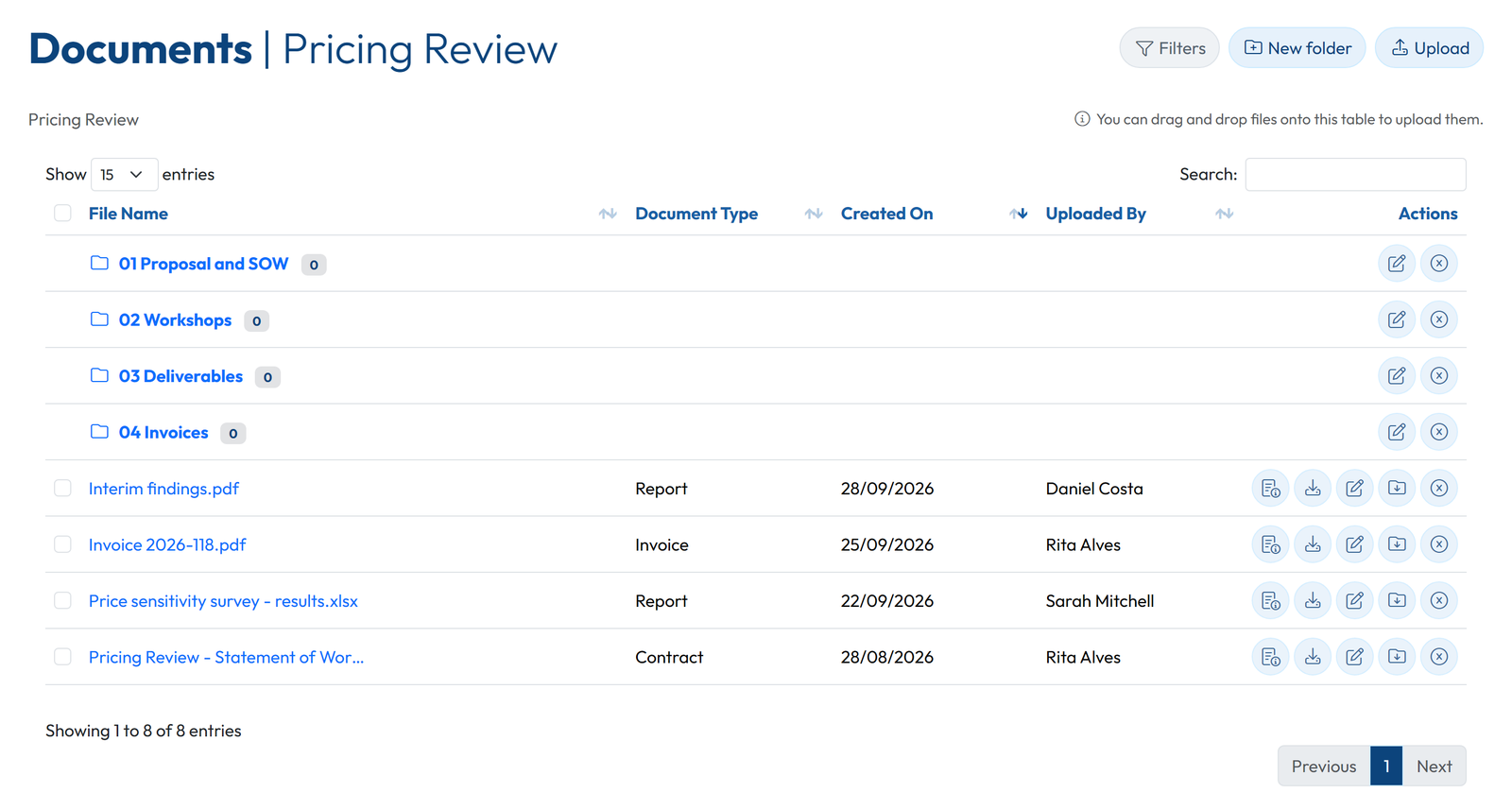
- Upload the signed scope document and the latest deliverables into the contract's folders. If your scope document needs work, start from a statement of work template.
- Invite your client contact by email. They sign in from the browser, in the language they choose, at no cost.
- The next time they ask "where are we?", answer in one line and point them to the portal.
If you also use Claude, the same free account can connect to Claude through MCP, within the 500 calls a month of the Free plan.
FAQ
Is there a client portal that is free forever?
Yes. GoCons Free, Assembly Free and FuseBase Free have no end date. They cap different things: active contracts and team users in GoCons (client users are unlimited), client contacts in Assembly, and portals in FuseBase.
Can I use Google Drive or Notion as a free client portal?
For files and a status page, yes. Neither tracks contracts, hours or invoices for you, so the portal is only as current as your last manual update.
Will my clients need to pay or install anything?
Not in GoCons. Client users are free and unlimited on every plan, and they sign in from a web browser. There are no native mobile apps; GoCons is a responsive web app that also works on a phone.
What happens when I outgrow the free plan?
In GoCons you move the same account to Silver (10 team users, unlimited active contracts, 10 GB), and your clients keep signing in as before. If you leave instead, the Admin downloads all the data first.
Open your free client portal this week
Pick the client who emails you most often and give them a portal before their next "where are we?". The GoCons Free plan has no end date, asks for no card and does not limit client logins: create your free GoCons account.
References
- Assembly, "Pricing", https://assembly.com/pricing (accessed October 2026).
- FuseBase, "Pricing", https://thefusebase.com/pricing/ (accessed October 2026).
- Notion, "Notion Pricing Plans: Free, Plus, Business, & Enterprise", https://www.notion.com/pricing (accessed October 2026).
- Google, "How your Google storage works", https://support.google.com/googleone/answer/9312312 (accessed October 2026).
- Google, "Share files from Google Drive", https://support.google.com/drive/answer/2494822 (accessed October 2026).
- ClickUp, "ClickUp Pricing and Plans", https://clickup.com/pricing (accessed October 2026).
- Basecamp, "Pricing", https://basecamp.com/pricing (accessed October 2026).
- Zoho, "Zoho Projects Pricing plans and Features", https://www.zoho.com/projects/pricing-comparison.html (accessed October 2026).
- Teamwork.com, "Teamwork.com User License Types", https://support.teamwork.com/projects/people/license-types (accessed October 2026).
- Teamwork.com, "Pricing Plans", https://www.teamwork.com/pricing/ (accessed October 2026).
- SuiteDash, "Pricing", https://suitedash.com/pricing/ (accessed October 2026).
- Clinked, "Free Client Portal Software: Avoid risks and What to Look For Before You Choose", https://www.clinked.com/blog/free-client-portal-software-what-to-look-for-and-what-to-avoid (accessed October 2026).
- Plutio, "Pricing", https://www.plutio.com/pricing (accessed October 2026).
- Bonsai, "Pricing", https://www.hellobonsai.com/pricing (accessed October 2026).
- Dubsado, "Pricing", https://www.dubsado.com/pricing (accessed October 2026).
- HoneyBook, "Pricing", https://www.honeybook.com/pricing (accessed October 2026).
- Moxo, "Pricing", https://www.moxo.com/pricing (accessed October 2026).
© 2026 Mourinho Solutions. All rights reserved.