It is Thursday afternoon. Sofia at Kestrel Labs emails to ask how the price survey is going, and the honest answer is spread across a task list, an hours sheet and last week's email thread. You open Claude to draft the reply, then paste fragments into it one by one, because Claude has never seen your contracts.
Claude MCP removes the pasting. With the Model Context Protocol (MCP), Claude can call tools inside another application and read the live record instead of your summary of it. This tutorial shows how to connect Claude to a consulting workspace, which questions are worth asking first, and what Claude can and cannot change on your behalf.
The examples use GoCons, the contract and project workspace we built at Mourinho Solutions for our own consulting projects and then opened to other consultancies. The Claude steps are the same for any remote MCP server.
What Claude MCP does, and what it does not
MCP is an open standard that Anthropic introduced in November 2024 to connect AI assistants to the systems where data lives [1]. In December 2025 Anthropic donated it to the Agentic AI Foundation, a fund under the Linux Foundation co-founded with Block and OpenAI, so no single vendor controls it [2]. In Claude, a remote MCP server that you add by its address is called a custom connector [3].
Connecting does not give Claude a copy of your database. Each time you ask something, Claude picks one of the tools the server publishes (search contracts, list invoices, record task progress), the server runs it with your permissions, and Claude writes the answer from what came back. Two consequences matter for a consultancy:
- Answers are as current as the workspace at that moment, not as your last export.
- Claude can only do what the server exposes and what your role allows. In GoCons, for example, files are uploaded in the web app: no tool uploads them through Claude.
Before you start: three checks
- Your Claude plan. At the time of writing (October 2026), custom connectors added by URL work on the Free, Pro, Max, Team and Enterprise plans, and on Free you can add one custom connector [3].
- Who adds it. On Team and Enterprise plans an Owner adds the connector for the organization first, and members then connect with their own account [3].
- Your GoCons plan. The MCP server is included in every GoCons plan, Free included, with a monthly allowance of calls: 500 on Free, 10,000 on Silver and 100,000 on Gold at the time of writing (October 2026). Every tool Claude runs on GoCons counts as one call, so a question that needs three lookups uses three. Current allowances are on the pricing page.
Claude MCP setup, step by step (web and desktop)
The whole connection is one address: https://gocons.eu/mcp. There is no API key to create and nothing to install.
- Open the connectors page. In Claude on the web, go to Customize > Connectors. In the desktop app, select Customize in the sidebar, then Connectors [4].
- Add the connector. Click Add custom connector, name it GoCons and paste
https://gocons.eu/mcp. Leave the OAuth client ID and secret empty. If the dialog asks how Claude should identify itself, keep Use Claude's published identity: GoCons supports it and does not use automatic client registration. Click Add [3]. - Sign in to GoCons. Click Connect if the sign-in does not start on its own. On the web the GoCons page opens in the same tab; in the desktop app it opens in your browser [4]. Sign in with your usual GoCons account, check the name of the app asking for access, and click Allow access.
- Turn it on in a chat. Back in Claude, GoCons appears under Your connectors as Connected. In a conversation, open the + menu, choose Connectors and check that the GoCons toggle is on [4].
- Set tool permissions. The first time Claude uses a tool, it can ask you to Allow once or Always allow [4]. Under Customize > Connectors > GoCons you can set each tool to Always allow, Needs approval or Blocked. My suggestion: Always allow for the read tools, Needs approval for anything that writes or deletes.
On a Team or Enterprise plan, the Owner does steps 1 and 2 under Organization settings > Connectors (Add, then Custom, then Web), and each member then clicks Connect and signs in with their own GoCons login [3]. That detail matters: every person reaches GoCons with their own role, never with the Owner's. Once connected, the connector also works in the Claude mobile app [4].
Claude Code
Connectors you add in claude.ai are available in Claude Code when you sign in with the same Claude account [4]. To add GoCons from the terminal instead, run claude mcp add --transport http gocons https://gocons.eu/mcp, then type /mcp inside Claude Code, choose gocons and select Authenticate.
Five questions to ask on day one
The examples below use a fictional consultancy, Northbridge Advisory, on September 29, 2026. Claude's wording changes from one conversation to the next; the facts come from GoCons.
| You ask | Claude answers |
|---|---|
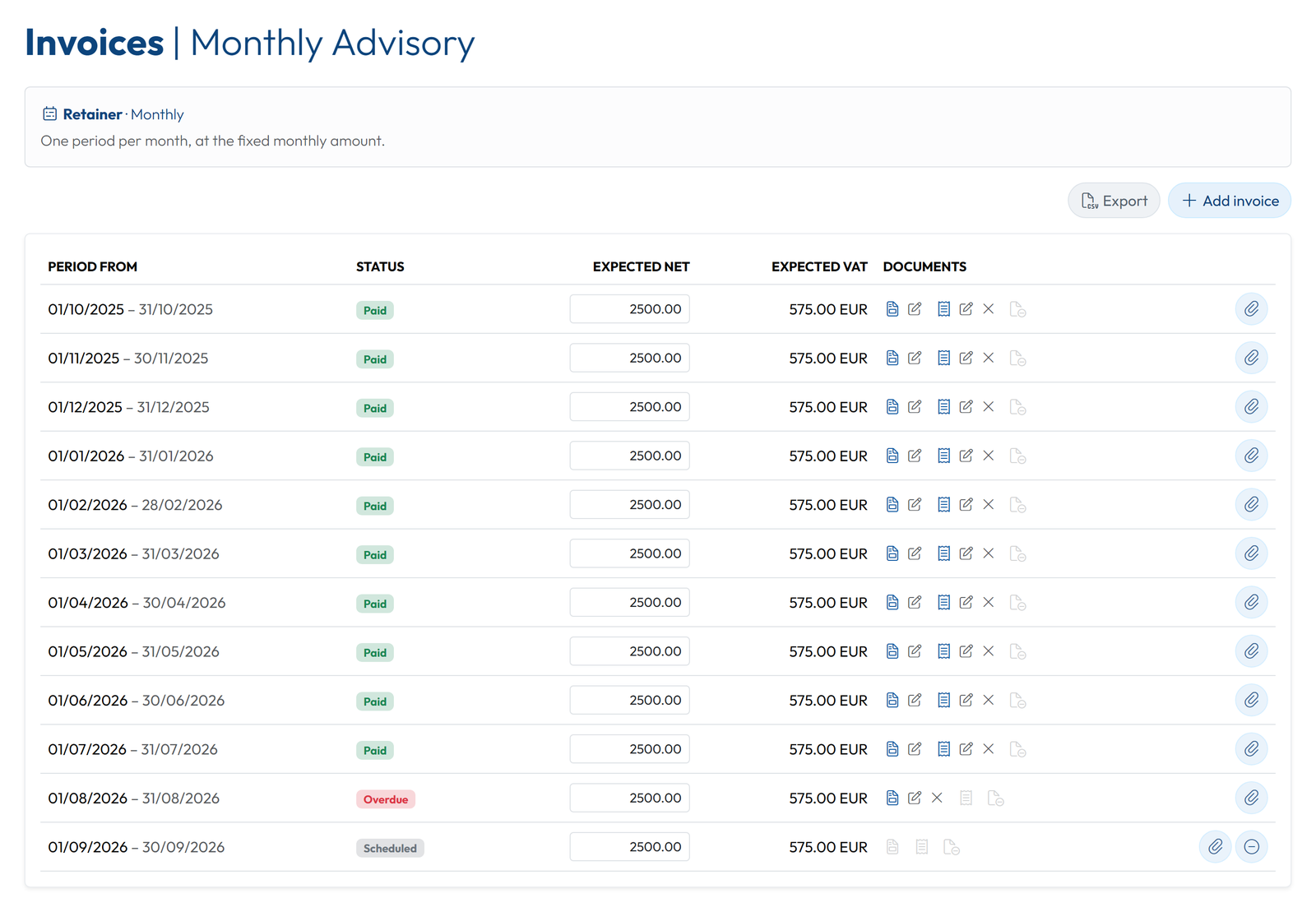
| Which invoices are overdue across our contracts? | One. The August 2026 invoice on Monthly Advisory for Oakfield Foods, EUR 2,500 net plus EUR 575 VAT, is overdue, with no payment or receipt recorded. The ten months before it, October 2025 to July 2026, are paid. |
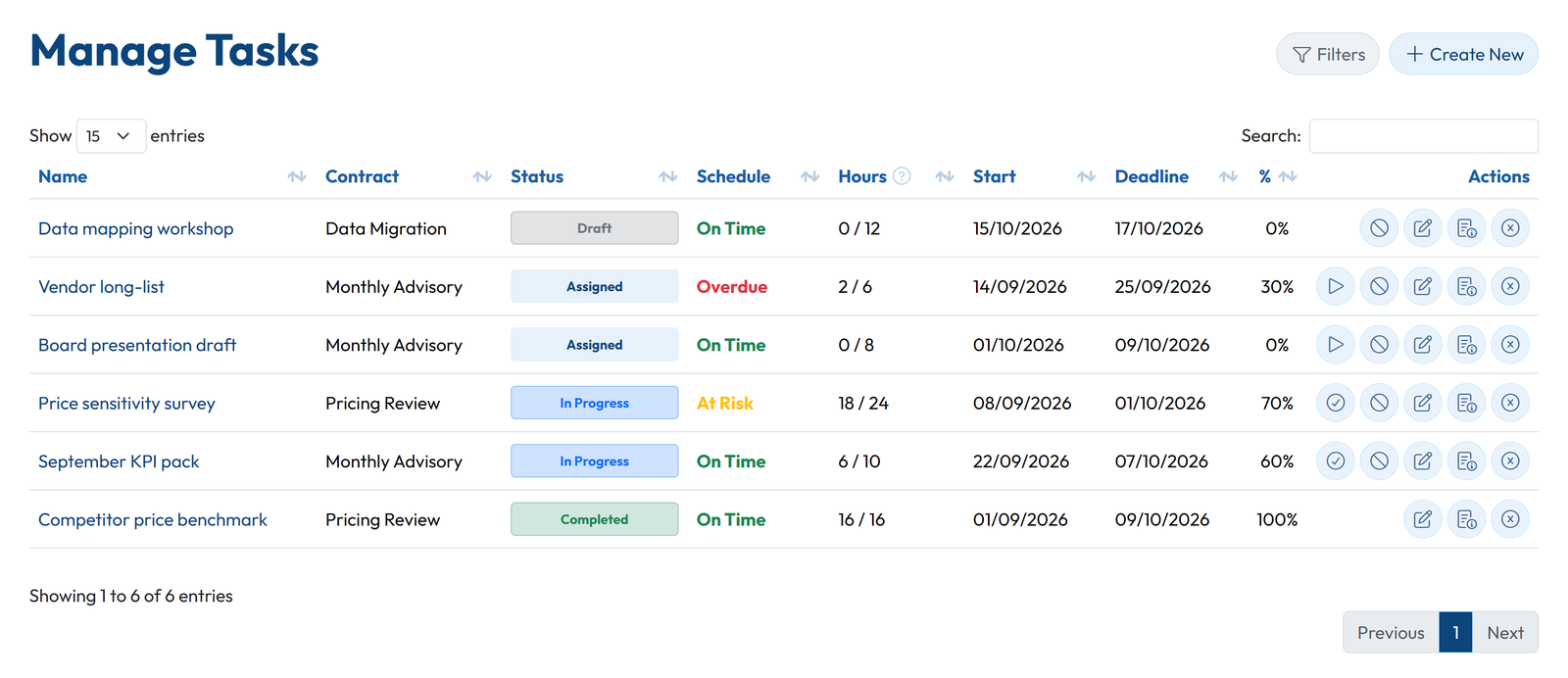
| What is at risk this week? | Price sensitivity survey on Pricing Review (Kestrel Labs) is flagged At Risk: 70% complete, 18 of 24 estimated hours used, deadline October 1, with Survey results review due the next day. On Monthly Advisory (Oakfield Foods), Vendor long-list is already overdue: 30% done, due September 25. |
| Which contracts have not started yet, and where does each stand? | Four. Digital Strategy 2027 (Atlas Retail) is a Prospect, ERP Selection (Meridian Cargo) is In Negotiation, Data Migration (Vitalis Clinic) is Pending Signature, and Website Care Plan (Harbour Homes) is Scheduled to start on October 1. |
| Draft a short status note for Sofia at Kestrel Labs. | Pricing Review, week of September 28: the competitor benchmark was delivered on September 11, one day before its milestone date. The price sensitivity survey is 70% complete and due October 1, and we will review the results with you on October 2. |
| Mark the August invoice for Oakfield Foods as paid today. | Before I change anything: the August 2026 invoice on Monthly Advisory (Oakfield Foods), Paid on: empty, new value 29/09/2026. The August line would then show Paid. Shall I go ahead? |
The last answer is a question, not an action. Nothing changes until you say yes, and after you do, Claude reports what GoCons actually recorded.
What Claude can change, and who decides
When I was on the buying side of software, at SISTRADE and later at UNICEF, the first question about any integration was never what it could do. It was who could change what through it. With Claude MCP, the answer is your GoCons role: Claude never has more rights than the person who signed in.
| Your GoCons role | What Claude can do for you |
|---|---|
| Admin | Read the whole workspace. Create, update and delete contracts and run their lifecycle (suspend, resume, renew, terminate), tasks, milestones, folders, documents, invoices and payments, and billing lines. Invite clients and team members. |
| Regular User | Read contracts, tasks, milestones and invoices. Start, complete and record progress on the tasks assigned to you. |
Three safeguards sit on top of the roles. GoCons instructs Claude to read the item first, show you the field with its old and new value, and wait for an explicit yes before any change. Deletions are confirmed one item at a time, by name. And Claude adds its own approval prompt for every tool you have not set to Always allow.
One more boundary: the MCP server is for your consultancy team. Your clients never need Claude, or any AI account, to follow the work. They see their contracts, milestones, tasks, hours and documents in the client portal, with a free login in the browser.
The security questions your partners will ask
- Where does my password go? Only into GoCons. The connection uses OAuth 2.1, the standard the MCP specification bases its authorization on [5]: you sign in on gocons.eu, and Claude receives a token, not your password. No API key is created or pasted anywhere.
- How do I switch it off? In GoCons, My Profile lists your Connected apps, one row per connection, each with its own Disconnect. Changing your GoCons password disconnects every assistant at once. In Claude you can also disconnect or remove the connector [4].
- What about prompt injection? Text inside a document or an email can try to steer an assistant. Anthropic's advice for custom connectors is to connect only to servers from trusted organizations, review tool approval requests, and click Always allow only for trusted servers [3]. Keeping write tools on Needs approval is the practical version of that advice.
If you are still deciding where client work should live before you connect any assistant to it, our comparison of client portal software covers the options.
FAQ
Is Claude MCP free to use?
On Claude's side, custom connectors are available on every plan, with one custom connector on Free [3]. On the GoCons side, the MCP server is part of every plan, including Free with 500 calls a month at the time of writing (October 2026).
Do I need a developer to set it up?
No. You paste one URL, sign in to GoCons and click Allow access. In Claude Code it is one command.
Does it work with ChatGPT and other assistants?
ChatGPT (in developer mode), Claude Code and Visual Studio Code connect to the same address. Cursor is not supported yet. The GoCons MCP page lists what each one needs.
Do I need an implementation project first?
No. Create the account, add a contract, invite the client, and connect Claude once there is something to ask about. GoCons is priced per consultancy, not per user, and client users are free and unlimited.
What happens to my data if I stop using GoCons?
Disconnect Claude in Connected apps, then use Download my data. On every plan, including Free, the Admin gets one zip with every contract, client and team member as Excel files, plus every document in its folders.
Try it on your own contracts
The quickest way to judge Claude MCP is to ask it about work you know well. Create a free GoCons account, add one contract and connect Claude with the steps above.
References
- Anthropic, "Introducing the Model Context Protocol", https://www.anthropic.com/news/model-context-protocol (accessed October 2026).
- Anthropic, "Donating the Model Context Protocol and establishing the Agentic AI Foundation", https://www.anthropic.com/news/donating-the-model-context-protocol-and-establishing-of-the-agentic-ai-foundation (accessed October 2026).
- Anthropic, "Add a connector that isn't in the directory", Claude documentation, https://claude.com/docs/connectors/custom/add-unlisted (accessed October 2026).
- Anthropic, "Get started with connectors", Claude documentation, https://claude.com/docs/connectors/getting-started (accessed October 2026).
- Model Context Protocol, "Authorization", MCP specification, https://modelcontextprotocol.io/specification/latest/basic/authorization (accessed October 2026).
© 2026 Mourinho Solutions. All rights reserved.