It is the last working day of the month. A retainer client has emailed two requests that should have been tickets, the quote for a follow-up project is still a Word file on someone's laptop, and the bookkeeper wants to know which period last month's invoice covered. Accelo was built to connect exactly these moments, from quote to cash, so when a small consultancy starts searching for Accelo alternatives, the idea is rarely the problem.
The friction is in what comes with it. The price arrives as a custom quote. Onboarding is measured in weeks. And since buying Forecast in 2025, Accelo leads with AI resourcing and margin forecasting, which is a lot of platform for a firm of five that just wants its quotes, retainers and invoices to stop living in four places.
What I learned building GoCons for our own consulting projects is that the costly gaps sit in the middle of that chain: what was agreed, what was delivered and what the client can see. So this comparison does not ask which tool has the most modules. It asks which of Accelo's jobs you actually need, and which simpler tool does each one. Having bought software and consulting services at SISTRADE and UNICEF, I also know what a vendor's honesty about limits is worth, so I list ours too.
What Accelo does well, and what has changed
Accelo is a professional services automation (PSA) platform that connects project management, resourcing, time tracking and financials in one system [1]. Its client side is broad: a native CRM with quotes and branded proposals, email and calendar sync with Gmail and Microsoft 365, and a client portal where clients see their projects, issues and retainers, approve signoffs, share files, and view and pay invoices [2][3]. It integrates with QuickBooks Online, Xero, Sage Intacct, HubSpot, Salesforce and Jira, among others [1].
Two things have changed if you last looked a while ago. In July 2025 Accelo bought Forecast, a maker of AI resource planning software, and its site now leads with AI-assisted resourcing, risk prediction and an MCP connector for ChatGPT, Claude, Copilot Studio and Gemini [4][5]. And there is no public price list: Accelo prices by team size and growth goals, through a custom quote that includes implementation guidance and onboarding, and it says most teams are up and running within weeks [6].
Its plan descriptions on GetApp show how the platform is split. Professional covers projects, sales, quotes, timesheets and client invoices with payments; Business adds retainers, ticket management, a shared request inbox and unlimited client portal users; Advanced adds custom workflows, automations and smart scheduling [7]. Reviews are good: 4.5 out of 5 from 178 reviews on Capterra, with 4.2 for ease of use and 4.3 for value for money, and the criticism that does appear is mostly about the interface and reporting [8].
When Accelo is the right choice
- You run retainers and support tickets for the same clients, as many IT service firms do, and want both next to the projects.
- You want one system from the first quote to the paid invoice, with clients paying online in the portal.
- You have the team, and the patience, for a structured onboarding measured in weeks.
Unbundle Accelo: five jobs, and a simpler tool for each
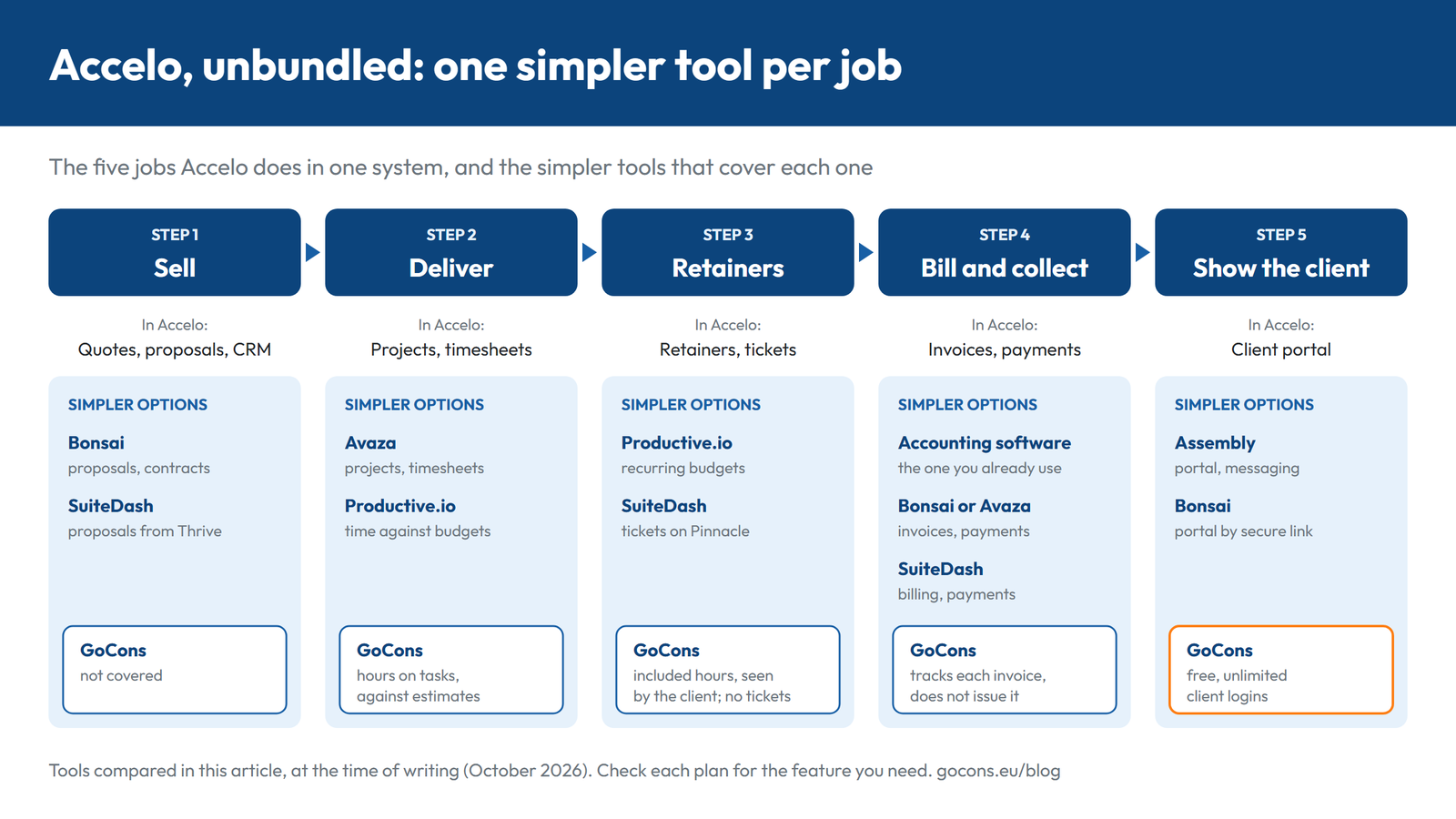
Accelo is a chain of five jobs. A small consultancy rarely needs all five from one vendor, and it usually owns a tool for at least one of them already: the accounting software.
- Sell: quotes, proposals and contracts. Bonsai and SuiteDash both include proposals and contracts. If you write statements of work in Word, my statement of work template is a good starting point.
- Deliver: projects, tasks and hours. Avaza and Productive track time against projects; GoCons records hours on tasks against their estimates.
- Retainers and requests: included hours, recurring budgets and tickets. Productive runs retainers as recurring budgets, SuiteDash has a support tickets toolkit on its top plan, and GoCons stores each retainer's monthly amount and included hours where the client can see them.
- Bill and collect: invoices and payments. Your accounting software, or Bonsai, Avaza or SuiteDash, can issue invoices and take payments. GoCons does neither; it tracks which period each invoice covered and whether it was paid.
- Show the client: the portal. Assembly and Bonsai offer client portals, and GoCons gives every client a free login to a portal built around their contracts.
Accelo alternatives compared
Prices below are what each vendor's pricing page showed at the time of writing (October 2026).
| Tool | Price | Client portal | Issues invoices? | Best for |
|---|---|---|---|---|
| Accelo | Custom quote [6] | Projects, issues, retainers and invoices with online payment; unlimited portal users listed with Business [3][7] | Yes, with payments | One system from quote to paid invoice |
| Bonsai | $9 to $49 per user a month (yearly); portal from $19 [9] | Branded portal opened through a secure link [10] | Yes, with payments | Small teams that sell with proposals |
| SuiteDash | $19, $49 or $99 a month, flat [11] | White-label portals; unlimited clients and staff [11] | Yes, with payments | Portal, billing and tickets at one flat price |
| Avaza | Free; $11.95 to $47.95 a month, plus $7 per extra user [12] | Clients collaborate on projects; unlimited collaborators [12][13] | Yes, with online payments | Quote, timesheet and invoice on a small budget |
| Productive.io | From $10 per user a month (yearly), minimum 3 seats [14] | Clients free; approved time on budgets [14] | Yes, including retainer invoicing | Retainer-heavy firms of ten or more |
| Scoro | Quote to Cash €25 / $29 per user a month, minimum 5 users [15] | Customer portal costs extra [15] | Yes | Accelo's model with a published price |
| Assembly | Free for 5 contacts; $29 to $499 a month (yearly) [16] | Client portal with messaging; client contacts capped by plan [16] | Billing and payments included | A polished portal with messaging and payments |
| GoCons | Free, then €29 or €69 a month for the whole consultancy | Free, unlimited client logins on all plans | No: records invoices from your accounting software | Contracts and retainers with billing schedules clients can see |
Six simpler tools, one by one
1. Bonsai: for consultants who sell with proposals
Bonsai, now a Zoom company, covers the commercial chain for independent consultants and small firms: CRM, proposals and contracts, projects and time tracking, invoices and payments, and a client portal [9]. Basic costs $9 per user per month billed yearly ($15 monthly); Essentials, which adds invoicing, payments, proposals, contracts and the client portal, costs $19 ($25); Premium costs $29 ($39) and Elite $49 ($59) with a 3-user minimum. There is a 7-day trial [9]. Clients open the branded portal through a secure link, without creating an account [10].
- Replaces from Accelo: quotes and proposals, invoicing and payments, and the client portal.
- Watch for: per-user pricing, and QuickBooks and Xero integrations only from Premium [9].
2. SuiteDash: for one flat price instead of seats
SuiteDash bundles a CRM, white-label client portals, proposals, contracts with e-signature, invoicing and payments, projects and tasks, file sharing and support tickets [11]. It is not priced per user: Start costs $19 a month, Thrive $49 and Pinnacle $99 (or $180, $480 and $960 a year), with unlimited clients and staff on every plan and a 14-day trial. Proposals arrive with Thrive and the support tickets toolkit with Pinnacle [11].
- Replaces from Accelo: the CRM, proposals, invoicing, the client portal and, on Pinnacle, tickets.
- Watch for: it serves many kinds of business, from agencies to law firms and coaches, so expect to configure it yourself.
3. Avaza: for the quote-to-invoice chain on a small budget
Avaza combines projects, resource scheduling, timesheets, expenses, quotes and estimates, invoicing (including recurring and retainer invoicing) and online payments, and clients can collaborate on projects with you [13]. There is a Free plan, and paid plans cost $11.95, $23.95 and $47.95 a month, with 2, 5 and 10 users with timesheet access included, extra users at $7 a month each, and unlimited project collaborators [12].
- Replaces from Accelo: quotes, projects, timesheets and invoicing.
- Watch for: caps on active projects (5, 20, 50, then unlimited) and on invoices a month (5, 50, 100, then unlimited) [12].
4. Productive.io: for firms that live on retainers
Productive runs retainers as recurring budgets, creates draft invoices on retainer budgets automatically, sends payment reminders and lets clients see approved time against their budgets [14]. Clients join free. Essential is $10 per user per month on yearly billing and Professional, where recurring budgets start, $25, with a 3-seat minimum [14].
- Replaces from Accelo: retainers, timesheets, invoicing and resource planning.
- Watch for: it is a full PSA, closer to Accelo in scope than the rest of this list, and contractors pay like employees [14].
5. Scoro: for a like-for-like swap with a visible price
Scoro is the closest match to Accelo's model with a published price. Its Quote to Cash combination (estimates and budgets, project delivery, time tracking and invoicing) costs €25 or $29 per user per month, the End-to-End set with CRM costs €52 or $57, and the minimum is 5 users [15].
- Replaces from Accelo: most of the chain, from estimates to invoices, with CRM in the End-to-End set.
- Watch for: the customer portal is sold as an extra, and teams of more than 15 people need one of Scoro's onboarding packages rather than the free self-onboarding [15].
6. Assembly (formerly Copilot): for when the portal is the point
Assembly, formerly called Copilot, puts a CRM, a client portal, messaging, and billing and payments in one place, with an app builder on top [16]. The Free plan covers 5 active contacts (the client people who can sign in) and 1 internal user. Starter costs $29 a month billed yearly ($49 monthly) for 50 contacts; Professional costs $99 for 500 contacts, 3 internal users, custom domains and no Assembly badge; Advanced costs $499 for unlimited contacts [16].
- Replaces from Accelo: the client portal and client billing.
- Watch for: the price grows with the number of client contacts, payment processing fees apply when you collect through it, and its pricing page lists no time tracking or project budgets [16].
Where GoCons fits: the contract in the middle of the chain
GoCons does not replace Accelo's quote or invoice modules, and it does not try to. It runs the middle of the chain, where small firms lose track: the contract, what it includes, what has been delivered against it, what the client can see, and whether every period has been invoiced and paid.
Take a retainer of €2,500 a month with 20 hours included, billed at the end of each month with a 15-day payment term and renewable with 30 days' notice. You create it once, as a Retainer contract with those values. The client sees it in the client portal with its milestones, tasks and the hours used against the 20 included, and every status and date change is logged in the contract history, with the person and the time.
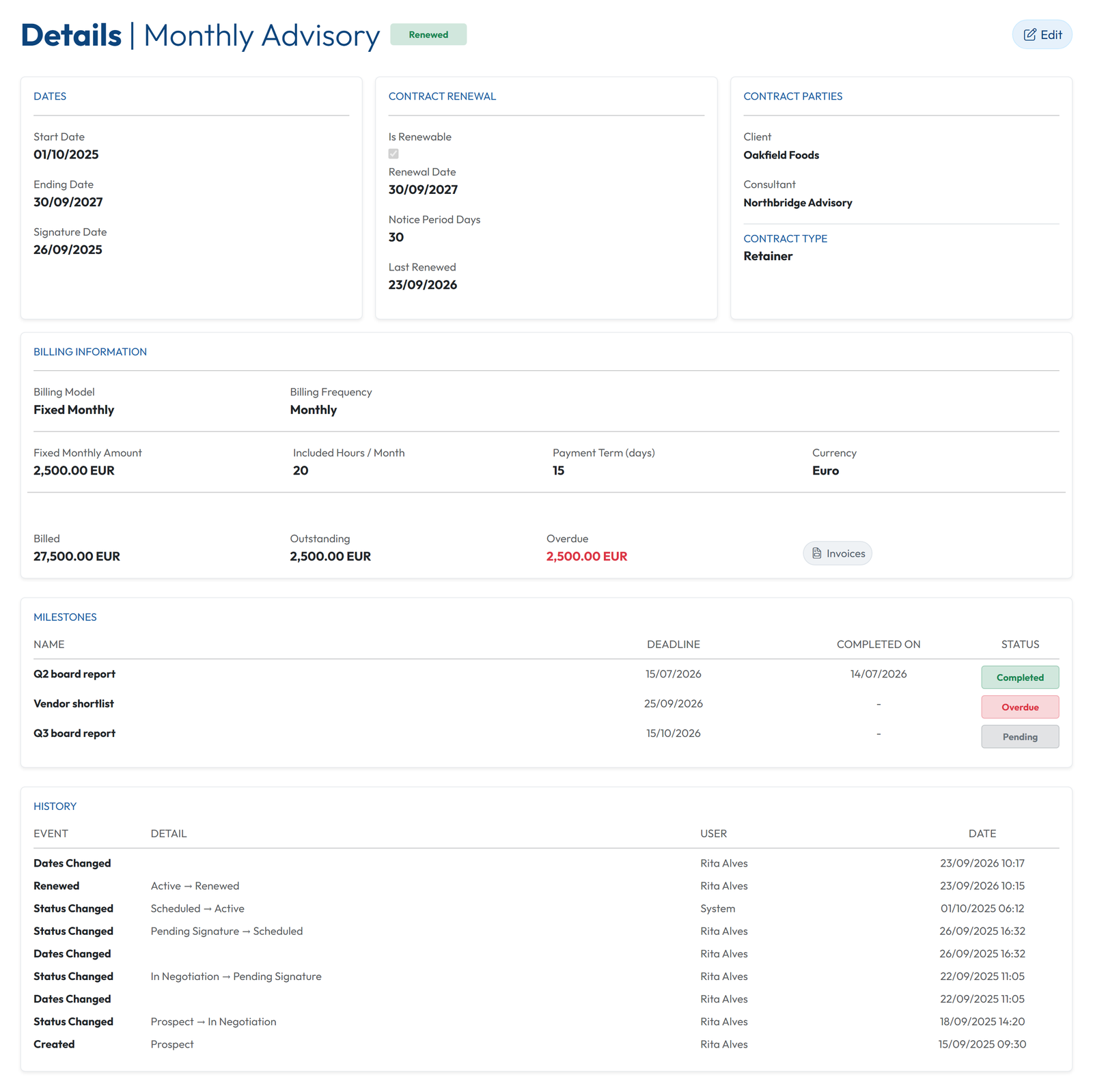
GoCons then builds the billing schedule from the contract dates and frequency, with one line per period, added as each period starts. When the month ends, you issue the invoice in your accounting software and attach it to that line, with the receipt or credit note when they exist. GoCons sends a reminder before each line is due, flags it as Overdue when the due date passes without payment, and the client sees the same billing history.
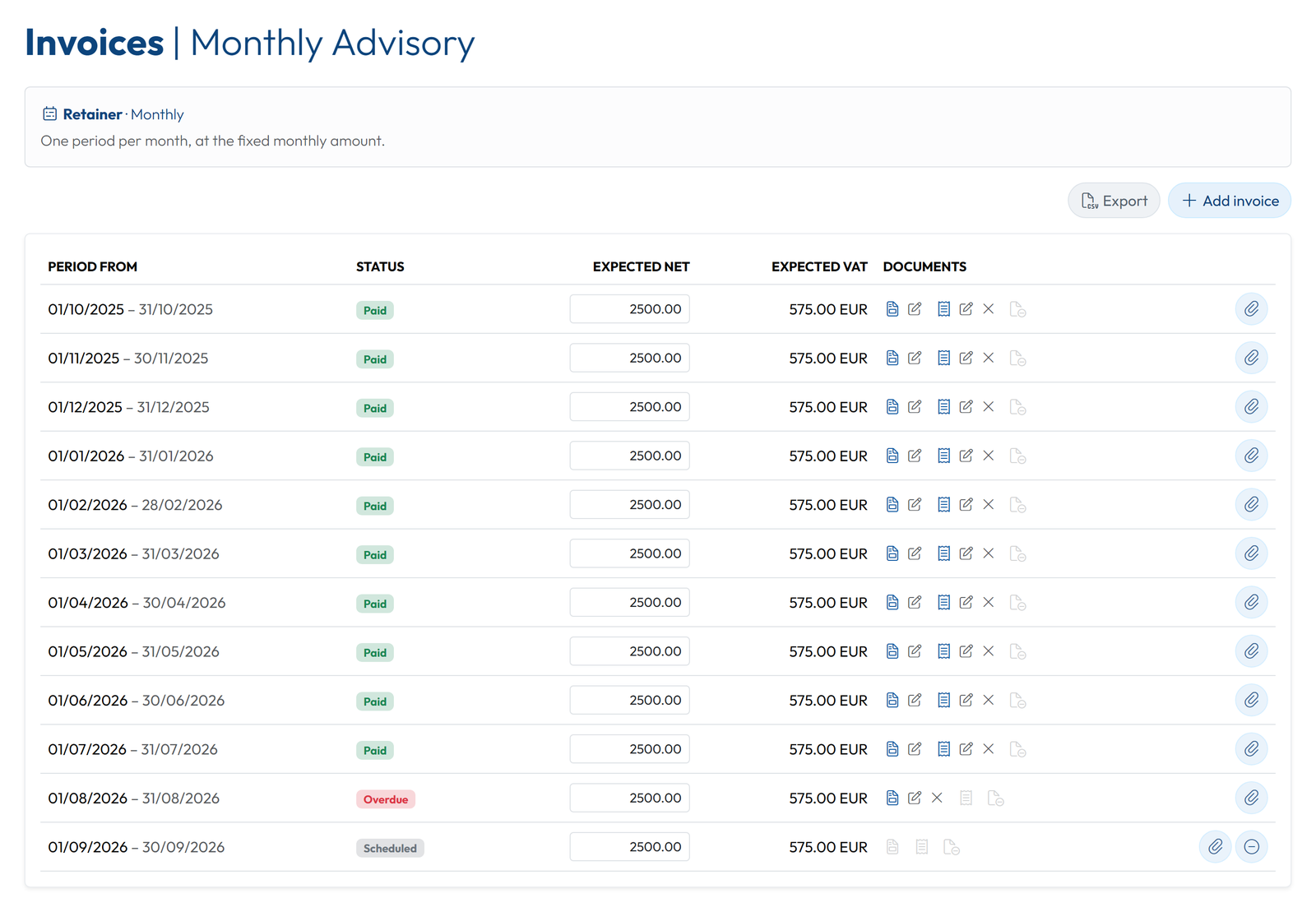
That is the honest difference from Accelo: Accelo issues the invoice and collects the payment, while GoCons records the invoice your accounting software issued and makes sure nobody, the client included, loses track of it. On Silver and Gold, those invoices can be exported as a CSV file for QuickBooks Online or Xero.
Where GoCons stops
- It never issues invoices, takes card payments or keeps your books.
- There is no CRM pipeline, no quote or proposal builder and no e-signature.
- There are no support tickets, in-app chat or comment threads.
- Hours are logged on tasks: there is no timer, no timesheet screen, no resource scheduling and no Gantt chart. If scheduling is what you need, I compared the options in my Kantata alternatives article.
- It runs in the browser on any device but has no native mobile app, and it cannot be white-labeled or put on your own domain.
What it costs, and what buyers ask
GoCons charges per consultancy rather than per seat, and client users are free and unlimited on every plan. At the time of writing, the Free plan is €0 (2 team users, 10 active contracts, no card), Silver is €29 ($34) a month with 10 team users and unlimited contracts, and Gold is €69 ($79) with 30 team users and Microsoft Entra ID single sign-on; the pricing page has the current figures. The interface is in 21 languages, each user picks theirs, and emails reach every recipient in their own language. On every plan, an MCP server lets Claude, ChatGPT (in developer mode) or Visual Studio Code read and update your data within your role, after you add its address, sign in and click Allow (how it works).
- An implementation project? None. You open an account, enter a contract and send the client an invitation; the four steps on the home page show the whole flow.
- A cost or an install for the client? Neither. Clients sign in from a browser for free, and a client organization can connect its own Microsoft directory for single sign-on.
- Leaving later? On any plan, Free included, an Admin can export the whole account: contracts, clients and team members as Excel files, with all documents in their folders.
FAQ
What is the best Accelo alternative for a small consultancy?
There is no single one, because Accelo does five jobs. Bonsai or SuiteDash suit firms that sell with proposals and want invoicing built in, and Productive suits retainer-heavy teams of ten or more. GoCons suits firms that already have invoicing software and need contracts, retainers and billing schedules their clients can see.
Is there an Accelo alternative with a free plan?
Yes. At the time of writing, Avaza, Assembly and GoCons have free plans. Bonsai offers a 7-day trial, and SuiteDash, Productive and Scoro offer 14-day trials, while Accelo is sold by custom quote.
Can I keep my accounting software?
Yes. GoCons never issues invoices: you attach the ones your accounting software produced, and Silver and Gold produce a CSV export for QuickBooks Online or Xero. Productive sends invoices to Xero, QuickBooks Online and other accounting tools from its Professional plan, and Bonsai connects to QuickBooks and Xero from Premium [9][14]. For the other tools, check the integrations list before you commit.
How do I move off Accelo without losing history?
Start with the active retainers and contracts. Recreate each one with its dates, amounts, included hours and notice period, attach the latest invoices to its billing schedule, and invite the client. Keep the old system available, read-only, until you no longer need its history.
Put one retainer on a billing schedule
Take the retainer that causes the most month-end questions, enter it in GoCons with its amount, included hours and billing frequency, attach last month's invoice and invite the client. You will not need a card, and nothing gets installed. Open a free GoCons account.
References
- Accelo, "AI-Powered PSA Software for Professional Services", https://www.accelo.com/ (accessed October 2026).
- Accelo, "Client Management Software for Professional Services", https://www.accelo.com/solution/client-management (accessed October 2026).
- Accelo Help Center, "Navigating the Client Portal Guide", https://help.accelo.com/guides/user/client-portal/navigating-the-client-portal/ (accessed October 2026).
- Balderton Capital, "Forecast announces acquisition by Accelo", https://www.balderton.com/news/forecast-announces-acquisition-by-accelo/ (accessed October 2026).
- Accelo, "Professional Services AI Software", https://www.accelo.com/ai (accessed October 2026).
- Accelo, "Accelo Pricing", https://www.accelo.com/how-to-buy (accessed October 2026).
- GetApp, "Accelo pricing", https://www.getapp.com/project-management-planning-software/a/accelo/pricing/ (accessed October 2026).
- Capterra, "Accelo", https://www.capterra.com/p/225762/Accelo/ (accessed October 2026).
- Bonsai, "Pricing", https://www.hellobonsai.com/pricing (accessed October 2026).
- Bonsai, "Client Portal", https://www.hellobonsai.com/client-portal (accessed October 2026).
- SuiteDash, "Pricing", https://suitedash.com/pricing/ (accessed October 2026).
- Avaza, "Avaza Pricing", https://www.avaza.com/pricing/ (accessed October 2026).
- Avaza, "Unified Project & Work Management for Teams", https://www.avaza.com/ (accessed October 2026).
- Productive, "Pricing & Plans", https://productive.io/pricing (accessed October 2026).
- Scoro, "Plans & Pricing", https://www.scoro.com/pricing/ (accessed October 2026).
- Assembly, "Pricing", https://assembly.com/pricing (accessed October 2026).
© 2026 Mourinho Solutions. All rights reserved.