The Kantata demo went well. The resourcing views were impressive, the margin forecasts beat anything your spreadsheets produce, and then the conversation turned to the rollout plan and to a price that only arrives as a quote. That is usually the moment a partner at a ten-person consultancy opens a new tab and starts looking for Kantata alternatives.
Meanwhile, the problems that sent you to the demo are still on your desk. On Monday someone rebuilds the staffing sheet by hand. On Friday the project lead copies hours from the timesheet into a status report, because the client emailed again to ask where things stand. At month end you discover that a retainer used up its included hours in the second week, and nobody told the client.
I have looked at this decision from several sides. I taught operations research, the discipline behind resource scheduling software, at the University of Porto. At SISTRADE and UNICEF I sat on the buying side of software and consulting contracts. And at Mourinho Solutions we built our own tool, GoCons, for our consulting projects before opening it to other firms. Below are six alternatives with prices you can check, an honest account of when Kantata is still the right call, and where our product fits.
What Kantata does well, and who it is built for
Kantata (formerly Mavenlink) is a professional services automation (PSA) platform. It connects resource management and forecasting, project delivery, time tracking and financial management, including invoicing, and it integrates with Salesforce, QuickBooks, NetSuite, Xero, Slack and Microsoft Teams [2]. If your problem is keeping eighty consultants utilized across three countries and currencies, that depth is exactly what you pay for.
Users rate it well: 4.2 out of 5 from 629 reviews on Capterra, with 4.0 for both ease of use and value for money. Capterra's pros and cons summary also lists "high cost for small teams" next to praise for its reporting [4].
What makes Kantata unusual is how candid it is about fit. In a post on its own blog, updated in July 2026, Kantata says that reviewers recommend it for organizations with 50 or more billable resources, that users often cite 6 to 8 weeks of implementation for mid-size organizations and 3 to 6 months for enterprise rollouts, and that a 10-person agency with one entity and one currency does not need its depth. It calls this "an intentional fit statement" [1]. Pricing follows the same logic: there is no public price list, and a PSA advisor builds a plan around your headcount, entities, currencies and integrations [1][5].
Clients join the client side of a project, usually as unlicensed external participants, with a limited view of that project's information [6]. Kantata also has an MCP server for Claude and ChatGPT with more than 150 tools; it needs Kantata AI activated, and an administrator creates an OAuth application whose ID and secret are pasted into the AI tool [3].
When Kantata is the right choice
- You have 50 or more billable people, several legal entities or currencies, and someone whose job is utilization.
- You need revenue forecasting and project financials connected to Salesforce or NetSuite.
- You can give a rollout of six weeks or more a dedicated owner on your side.
What a small consultancy needs instead
Resource allocation is a textbook operations research problem, and I taught versions of it for years. The honest lesson from that classroom is that optimization pays off when a problem is too large to see at a glance. Eight consultants and fifteen engagements fit on one screen. At that size, the expensive failures are rarely about who is staffed where. They happen in the gaps between the contract, the work and the client.
Walk through a normal week and note what actually breaks:
- Monday staffing. Who works on what this week. Below 20 people, a shared calendar or a light scheduler usually handles it.
- Hours against the budget. Consultants record hours every day, and someone has to notice that a task or a retainer is about to run over before the client notices it on an invoice.
- The Friday update. The client asks "where are we?" and the answer is spread across a task list, an hours sheet and three email threads.
- Month-end billing. Your accounting software issues the invoice, but nobody owns the question of which period it covered and whether it was paid.
- Renewals and notice periods. The end date sits in a signed PDF, and the notice window closes before anyone opens it.
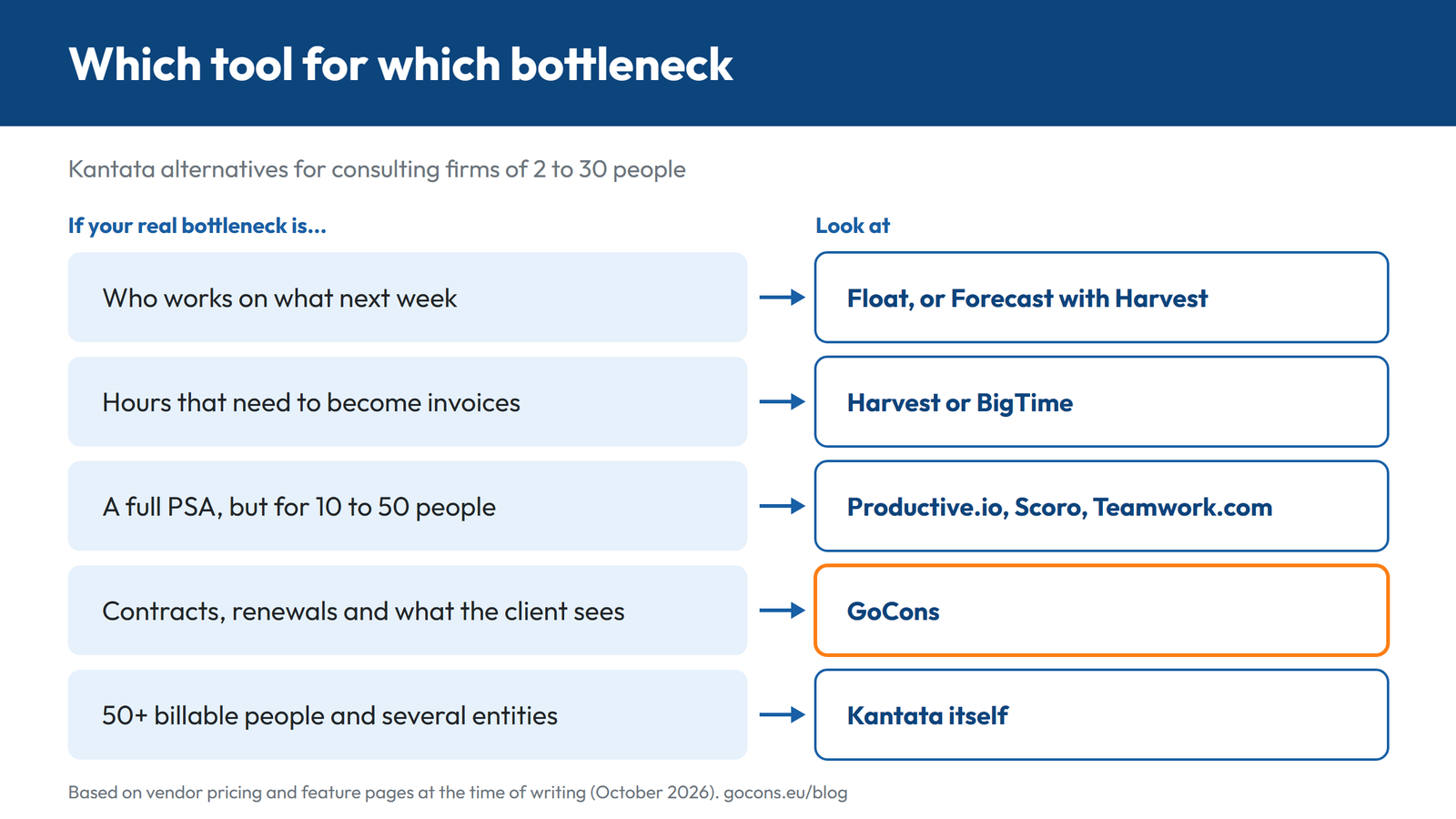
Kantata is strongest on the first two. Small firms usually feel the pain in the second to the fifth. That is the lens for the comparison below: match the tool to the job you have, not to the job a 200-person firm has.
Kantata alternatives compared
All prices are list prices at the time of writing (October 2026), from each vendor's pricing page, and most assume annual billing.
| Tool | Price | Client access | Resource planning | Best for |
|---|---|---|---|---|
| Kantata | Quote only [5] | Client side of a project, limited view [6] | Core strength, with forecasting | 50+ billable people, several entities |
| Productive.io | $10 to $25 per user a month (yearly), Ultimate on request, minimum 3 seats [7] | Clients invited free [7] | Included from Essential | 10 to 50 people who want a lighter PSA |
| Scoro | From €15 / $17 per user a month, minimum 5 users [8] | Customer portal is a paid extra [8] | Resource app, from €25 / $29 combinations | Quotes, delivery and billing in one system |
| BigTime | Essentials from $20 per user a month, higher plans on request [9] | Self-service portal from Advanced [9] | Separate module [9] | Firms that bill hours and want clean invoices |
| Teamwork.com | Free for up to 5 users; $9.99 to $24.99 per user a month (yearly) [10] | Client users free, five active projects each [11] | Capacity from Accelerate, by role or skill on Optimize | Teams that run client work in task lists |
| Float | $7 to $12 per scheduled person a month (yearly) [12] | Internal tool, free guest logins [12] | Core strength | Scheduling, and nothing else |
| Harvest + Forecast | Free plan; Teams from $9 per seat plus usage; Forecast $5 per person [13][14] | Clients receive invoices; no portal listed | Forecast, billed separately | Small teams that bill by the hour |
| GoCons | Free; €29 or €69 a month per consultancy | Unlimited free client users on every plan | None | Contracts, retainers, renewals and client visibility |
A worked example for a team of eight on annual billing, at list price: Productive Essential costs 8 × $10 = $80 a month, Teamwork.com Accelerate 8 × $24.99 = $199.92, Scoro Projects & Resources 8 × $29 = $232, and Float Starter 8 × $7 = $56 for scheduling alone. GoCons Silver is $34 a month for the whole firm, but it neither schedules people nor issues invoices, so compare the tools job by job, not line by line.
The six alternatives in detail
1. Productive.io: the closest thing to Kantata at small-firm scale
Productive covers the same core loop as Kantata: resource planning, time tracking, budgets and profitability, invoicing, a sales pipeline and forecasting [7]. Essential costs $10 per user per month billed yearly ($12 monthly), Professional $25 ($29 monthly), and Ultimate is priced on request. Every plan needs at least 3 seats [7]. Clients can be invited free of charge and can see approved time tracked against budgets, while freelancers and contractors pay the same as employees [7].
The catch: revenue forecasting and the Scenario Builder are Ultimate features, and recurring budgets for retainers start at Professional [7]. Choose it if you have 10 to 50 people and resource planning with budget control is the reason you looked at Kantata.
2. Scoro: a modular PSA you buy app by app
Scoro is made of eight apps (Sell, Estimate, Do, Deliver, Track, Resource, Spend and Invoice) that you combine. Combinations start at €15 or $17 per user per month, Projects & Resources costs €25 or $29, and the complete End-to-End set €52 or $57. The minimum is 5 users, and annual billing is 13 to 17% cheaper [8]. An MCP server for AI assistants is part of the platform [8].
The catch: the customer portal is a paid extra, and free self-onboarding is offered only to teams of up to 15 people. Scoro says that getting fully up and running takes from a few days to a few weeks or months [8]. Choose it if you want quotes, delivery and billing in one system and prefer to pay only for the parts you use.
3. BigTime: time and billing first
BigTime is a PSA for firms that bill for their time. Essentials starts at $20 per user per month and covers time and expense tracking, billing and invoicing, project portfolio management, and QuickBooks and HubSpot integrations. Advanced and Premier are priced on request [9]. A self-service client portal arrives with Advanced, and resource management and quoting are separate modules [9].
The catch: the features that resemble Kantata (resourcing, quotes, the client portal) sit on higher plans or add-on modules without a public price. Choose it if accurate hours and invoices are your main pain and resourcing can wait.
4. Teamwork.com: client work in tasks, with capacity planning
Teamwork.com is project management built for client work. The Free plan covers up to 5 users. Basics costs $9.99 per user per month (minimum 3 users) and Accelerate $24.99 (minimum 5), both billed yearly, and Accelerate adds workload and live capacity planning, time budgets and retainers, and invoices built from logged time [10]. Client users are free, although each one can join at most five active projects, and the Free plan does not include them [10][11].
The catch: scheduling by role or skill, multi-currency budgets and profitability insights, the parts closest to Kantata, belong to Optimize, which is priced on request [10]. Choose it if your team already lives in task lists and you want clients inside the projects.
5. Float: when scheduling is the part you wanted
If the screen that impressed you in the Kantata demo was the schedule, Float specializes in exactly that job. Starter costs $7 per scheduled person per month billed yearly ($8.50 monthly) and Pro $12 ($14 monthly), with a 30-day trial. You pay only for the people on the schedule; everyone else joins as a free guest [12]. Pro adds time tracking, client rate cards, project cost estimates and live dashboards [12].
The catch: Float is an internal planning tool, and its pricing page lists no invoicing and nothing client-facing, so it pairs with something else. Choose it if Monday staffing is your bottleneck and everything else already works.
6. Harvest + Forecast: hours, invoices and a simple schedule
Harvest tracks time and expenses and turns hours into invoices, with integrations for Stripe, QuickBooks Online and Xero. A Free plan covers 1 seat and 2 projects, and Teams starts at $9 per seat per month billed yearly ($11 monthly) [13]. Its sister product, Forecast, handles team scheduling for $5 per person per month billed yearly, and it counts both the people who schedule and the people being scheduled [14].
The catch: two products mean two bills, because Forecast is billed separately, and Harvest's pricing page says that beyond the base rate, additional invoices, projects, clients and tasks are billed on usage [13][14]. Choose it if you bill by the hour and want the shortest path from a timer to an invoice.
Where GoCons fits: contracts, client visibility and billing, without a PSA project
GoCons is not a PSA, and I will not pretend it is. It covers the part of the week where small firms lose money and goodwill: the contract, the work done against it, what the client sees, and whether each period was invoiced and paid.
Everything hangs off the contract. You choose one of nine contract types, from Retainer and Service Project to Time and Material and Success Fee, each with its own billing model, frequency, payment term and currency. A retainer stores its monthly amount and included hours; a renewable contract stores its renewal date and notice period. In Automated mode the status follows the dates, from Scheduled to Active to Renewed, and every status or date change goes into the contract history with who made it and when.
Hours are recorded on tasks, against the estimate, with a percentage complete and a schedule indicator: On Time, At Risk or Overdue. Team members with the Regular User role update the hours and progress of their tasks but cannot move dates, so the plan you agreed with the client stays the plan.
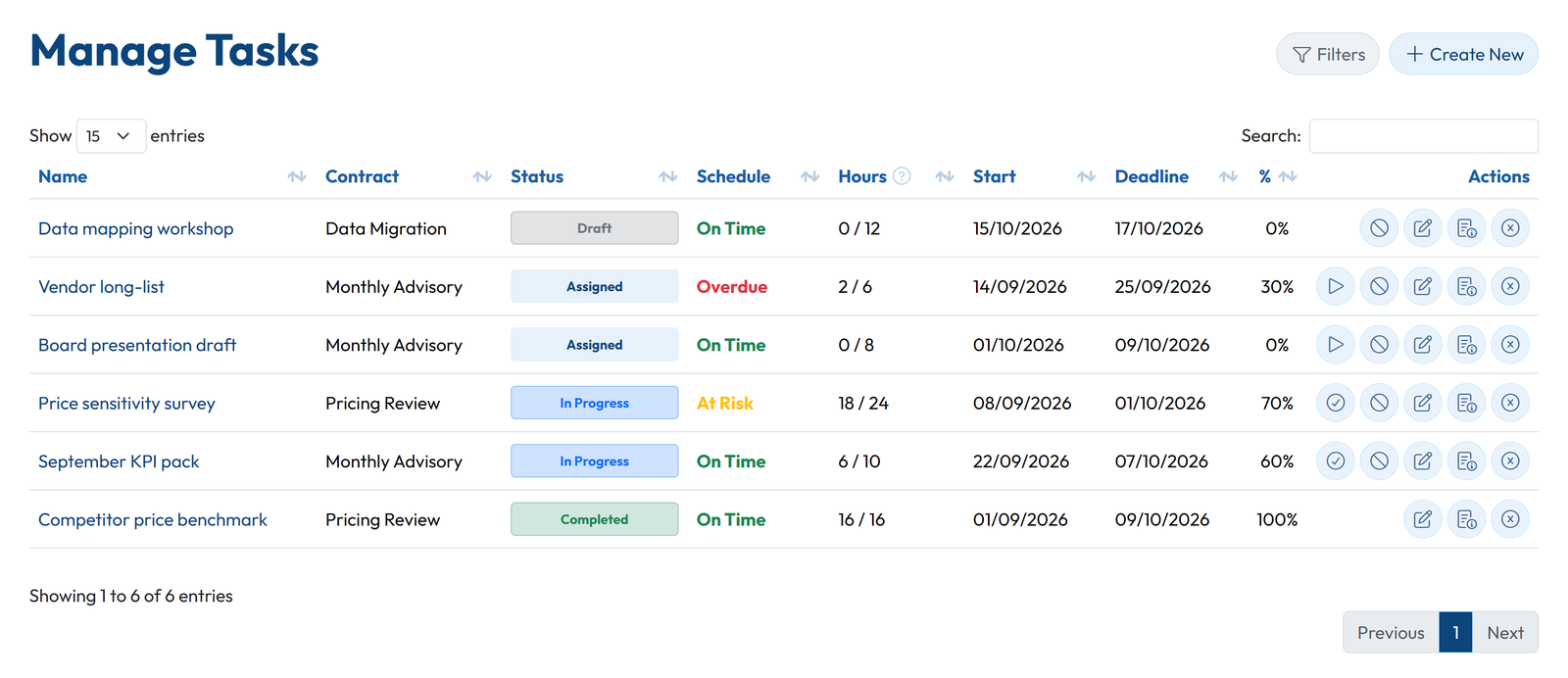
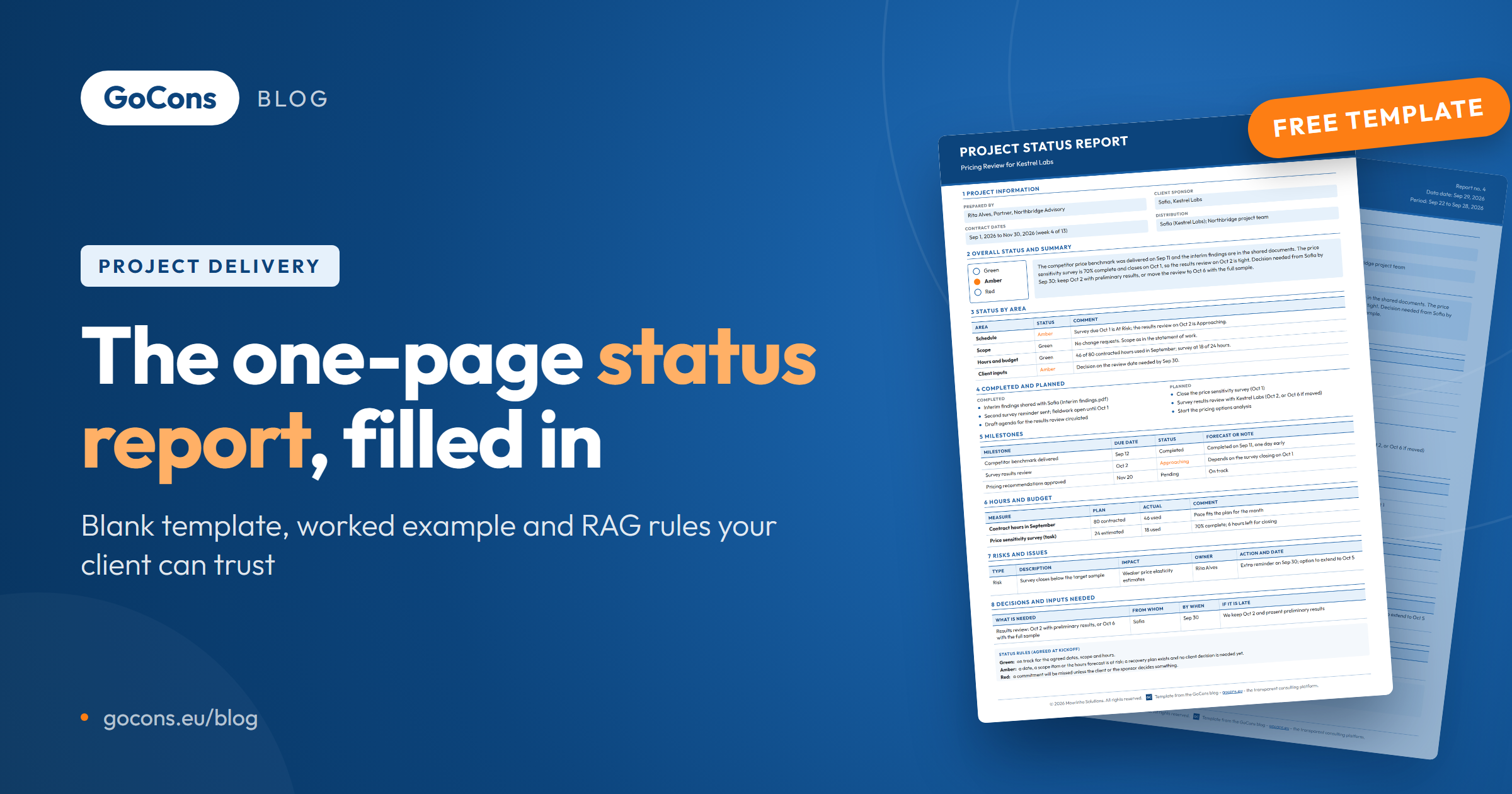
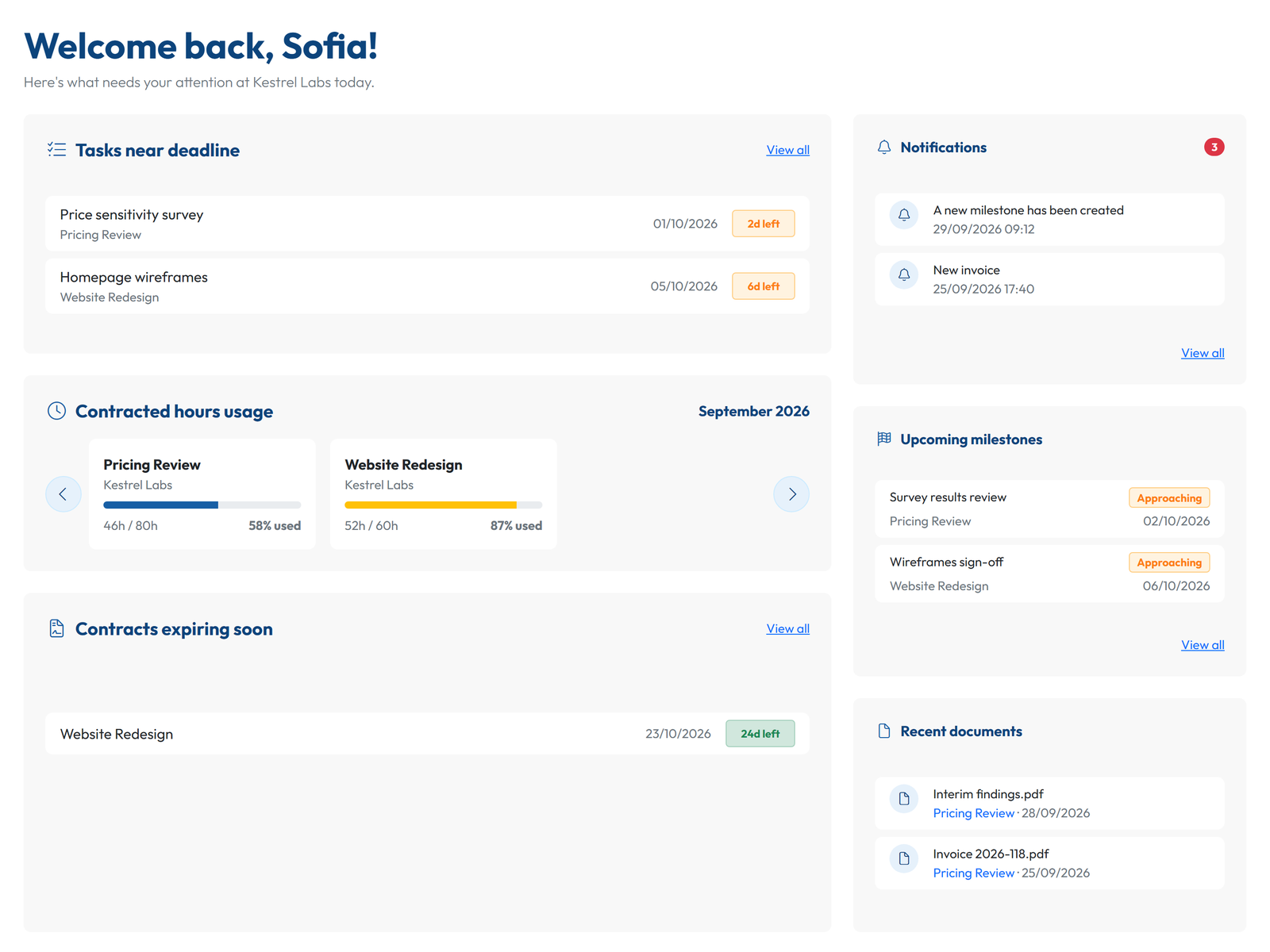
Then the Friday email. Every client gets a free login, with no limit on how many, and the client portal shows their contracts, milestones, tasks, the hours used against what was contracted, billing amounts and history, and the documents of their contracts. If you still send a weekly report, keep it short and point to the portal; the project status report template on this blog shows what is worth keeping.
At month end, each contract has a billing schedule with one line per period or milestone, generated from the contract dates and frequency. You attach the invoice that your accounting software issued, GoCons reminds you before each line is due and alerts you when one becomes overdue, and the client sees the same history. On Silver and Gold, invoices export as CSV for QuickBooks Online or Xero.
GoCons also has an MCP server for AI assistants: in Claude, ChatGPT (developer mode) or Visual Studio Code you add https://gocons.eu/mcp, sign in and click Allow, with no API keys to create. Every plan includes it, Free too, within a monthly call allowance; the MCP page lists what an assistant can do, and there is a step-by-step guide for Claude on this blog.
What GoCons does not do
- No resource scheduling or capacity planning. If Monday staffing is the bottleneck, pair it with Float or choose Productive.
- No timer or timesheet app: hours are recorded on tasks.
- No Gantt charts.
- It does not issue invoices, take card payments or do accounting.
- No CRM pipeline, proposal builder or e-signature, and no in-app chat or comment threads.
- No native mobile apps (it is a responsive web app) and no white-labeling or custom domains.
Pricing and the usual objections
Pricing is per consultancy, not per user. At the time of writing, Free costs nothing and includes 2 team users, 10 active contracts and unlimited client users, with no card required. Silver costs €29 ($34) a month for 10 team users, unlimited contracts, the REST API and invoice export, and Gold costs €69 ($79) for 30 team users, Microsoft Entra ID single sign-on and priority support. Current values are on the pricing page.
Do you need an implementation project? No: create the account, add a contract and invite the client. Will your client pay or install anything? No, they log in from a browser for free. What if you leave? An Admin can download everything at any time, on any plan including Free: one zip with every contract, client and team member as Excel files, and every document in its folders.
FAQ
What is the best Kantata alternative for a small consulting firm?
It depends on the job. Productive is the closest full PSA at small-firm scale, Float covers scheduling alone, and Harvest with Forecast covers hourly billing. If your pain is contracts, renewals and client visibility, GoCons covers that without an implementation project.
Is there a free Kantata alternative?
Kantata has no public price and no free plan. At the time of writing, Teamwork.com has a Free plan for up to 5 users, Harvest a Free plan with 1 seat and 2 projects, and GoCons a Free plan with 2 team users, 10 active contracts and unlimited client users.
Which Kantata alternatives let clients log in for free?
Productive does not charge for clients, Teamwork.com client users are free on paid plans with a limit of five active projects each, and GoCons includes unlimited client users on every plan. For a wider view, see my comparison of client portal software.
How long does switching take?
Kantata's own blog puts mid-size rollouts at 6 to 8 weeks, citing what its users report [1]. Most alternatives here start with a free plan or a 14 to 30 day trial that you can run on live work. In GoCons, moving a contract means entering its dates, amounts and included hours, then inviting the client.
Start with the contract that generates the most emails
Pick the client who asks "where are we?" most often, put that contract in GoCons with its tasks and billing schedule, and invite them. There is no card to enter and nothing to install. Create your free GoCons account.
References
- Kantata, "Fact vs. Fiction: Busting the Biggest Myths about Kantata", https://www.kantata.com/blog/article/fact-vs-fiction-busting-the-biggest-myths-about-kantata (accessed October 2026).
- Kantata, "Leading PSA Software for Professional Services", https://www.kantata.com/psa (accessed October 2026).
- Kantata Knowledge Base, "Kantata MCP Server Overview", https://knowledge.kantata.com/hc/en-us/articles/54639379181979-Kantata-MCP-Server-Overview (accessed October 2026).
- Capterra, "Kantata", https://www.capterra.com/p/110832/Mavenlink/ (accessed October 2026).
- Kantata, "Request Pricing", https://www.kantata.com/pricing (accessed October 2026).
- Kantata Knowledge Base, "User Types Overview", https://knowledge.kantata.com/hc/en-us/articles/12016642054171 (accessed October 2026).
- Productive, "Pricing & Plans", https://productive.io/pricing (accessed October 2026).
- Scoro, "Plans & Pricing", https://www.scoro.com/pricing/ (accessed October 2026).
- BigTime, "Pricing: Professional Services Automation Software", https://www.bigtime.net/pricing/ (accessed October 2026).
- Teamwork.com, "Pricing Plans", https://www.teamwork.com/pricing/ (accessed October 2026).
- Teamwork.com Support, "Teamwork.com User License Types", https://support.teamwork.com/projects/people/license-types (accessed October 2026).
- Float, "Float Pricing", https://www.float.com/pricing (accessed October 2026).
- Harvest, "Time Management & Invoicing at Cost Effective Pricing", https://www.getharvest.com/pricing (accessed October 2026).
- Harvest, "Time Planning Software Pricing: Harvest Forecast", https://www.getharvest.com/forecast/pricing (accessed October 2026).
© 2026 Mourinho Solutions. All rights reserved.