It is Friday, 4:30 pm, and the client's sponsor has just emailed: "Quick one, where are we on the survey?" The answer exists, but it is spread across the task list, the hours sheet and two email threads, so you open all of them and start rebuilding the weekly project status report by hand. An hour later you send a page that will be out of date by Monday.
This article gives you a free project status report template (one page, blank and filled in), the rules that make a status report worth reading, and a routine that turns the Friday rebuild into a short commentary.
I have been on both ends of these reports. As a consultant, I wrote them on Friday afternoons. On the client side, buying software and consulting services at SISTRADE and later at UNICEF, I read them, and the ones I acted on told me in the first lines whether I had to do something. Everything below follows from that.
What a project status report is for
PMI's PMBOK Guide files status reports under work performance reports: information put together so that the people who read it make decisions, take action or become aware of something [2]. That is a useful test for every line you write. If a sentence prompts no decision, no action and no awareness the reader did not already have, it is padding.
Clarity is not a matter of style. In PMI's research on project communications, about four in five projects communicated with sufficient clarity and detail, in the language of the audience, met their original goals; when the communication was not clear enough, just over half did [1]. The same report put 56 percent of the money at risk on projects down to ineffective communications [1].
And people scan reports rather than read them. In Nielsen Norman Group's classic study, 79 percent of test users scanned any new page and only 16 percent read word by word [5]. A status report has to work for a reader who stops after three lines.
The project status report template (free download)
The template fits on one A4 page. Change the colors if you like, but keep the order: the answer comes first and the evidence after.
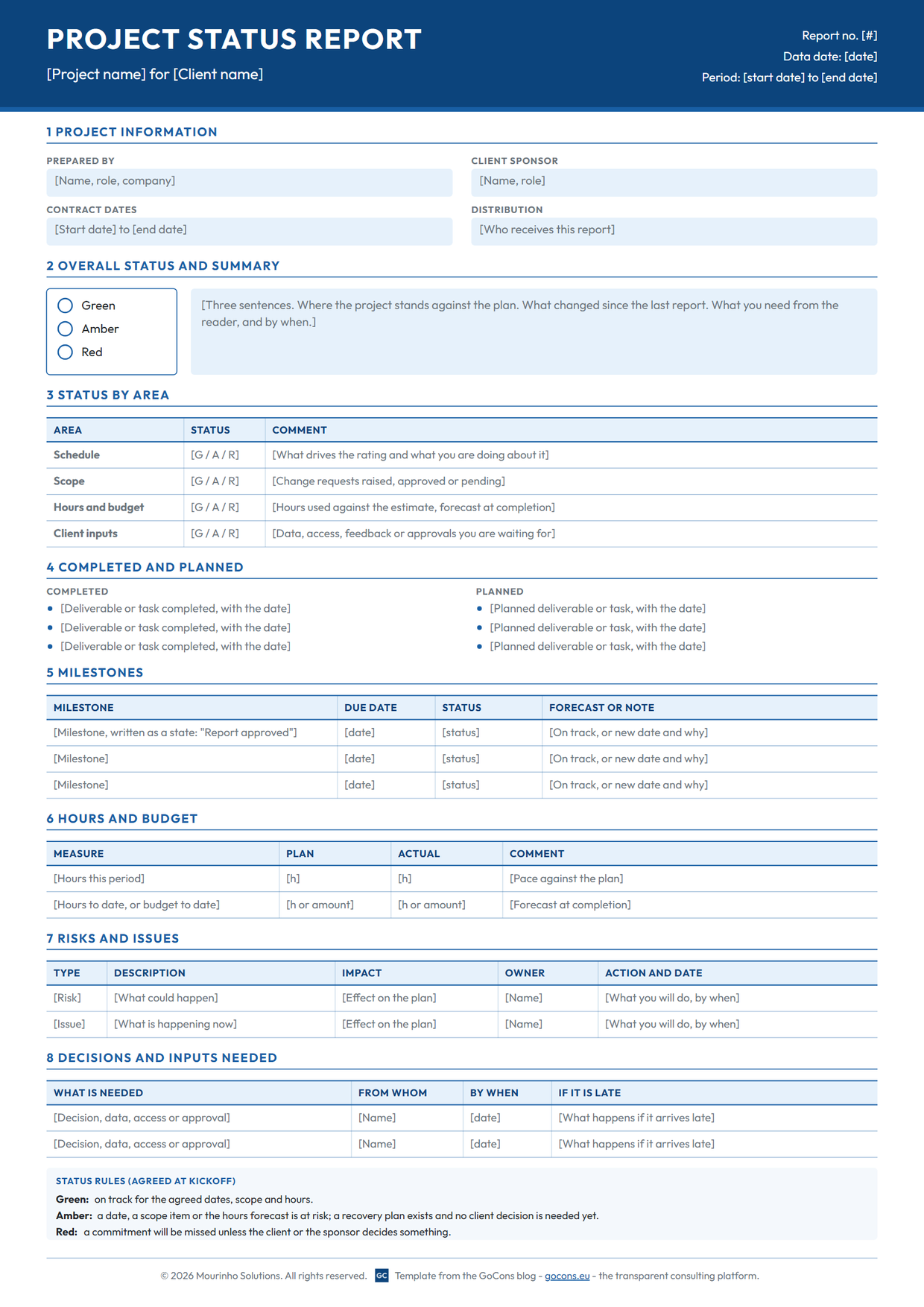
Download the template (PDF). Print it, or copy the sections below into your own document:
Rebuilding this report every week? In GoCons your client follows tasks, milestones and hours as they change, so the report shrinks to the decisions you need. Free to start, no card needed.
- Header. Project, client, report number, reporting period and data date. PMI defines the data date as the point in time when the status was recorded [3]. Write it, because a report read on Wednesday describes Monday.
- Project information. Prepared by, client sponsor, contract dates and who receives the report.
- Overall status and summary. Green, Amber or Red, plus three sentences: where the project stands against the plan, what changed since the last report, and what you need from the reader, by when.
- Status by area. Schedule, scope, hours and budget, and client inputs, each with its own rating and one line on what drives it. The scope you rate against is the one in the statement of work; if yours is thin, start from our statement of work template.
- Completed and planned. Three bullets each, with dates. Deliverables and results, not effort.
- Milestones. Milestone, due date, status and forecast. Write milestones as states ("Report approved"), not activities ("Analysis").
- Hours and budget. Plan against actual for the period and to date, with a forecast at completion.
- Risks and issues. A risk may happen; an issue is happening now [3]. Each one gets an impact, an owner and an action with a date.
- Decisions and inputs needed. What you need, from whom, by when, and what happens if it arrives late.
Define Green, Amber and Red before the first report
Most templates leave the colors undefined, so the rating turns into a mood. Agree the rules at kickoff and print them on every report. The ones on the template:
- Green: on track for the agreed dates, scope and hours.
- Amber: a date, a scope item or the hours forecast is at risk; a recovery plan exists and no client decision is needed yet.
- Red: a commitment will be missed unless the client or the sponsor decides something.
This is close to how the UK government rates its major projects: the rating is a judgment of the likelihood of delivering on time and on budget at a point in time, and Red signals that significant issues need urgent attention, not that the project has failed [4]. A Red that arrives with options is a conversation. A Red that arrives as a surprise is a trust problem.
Example: a filled-in project status report
Here is the same template filled in for a fictional engagement: the Pricing Review that Northbridge Advisory runs for Kestrel Labs, a 13-week one-off consulting project, as of September 29, 2026.
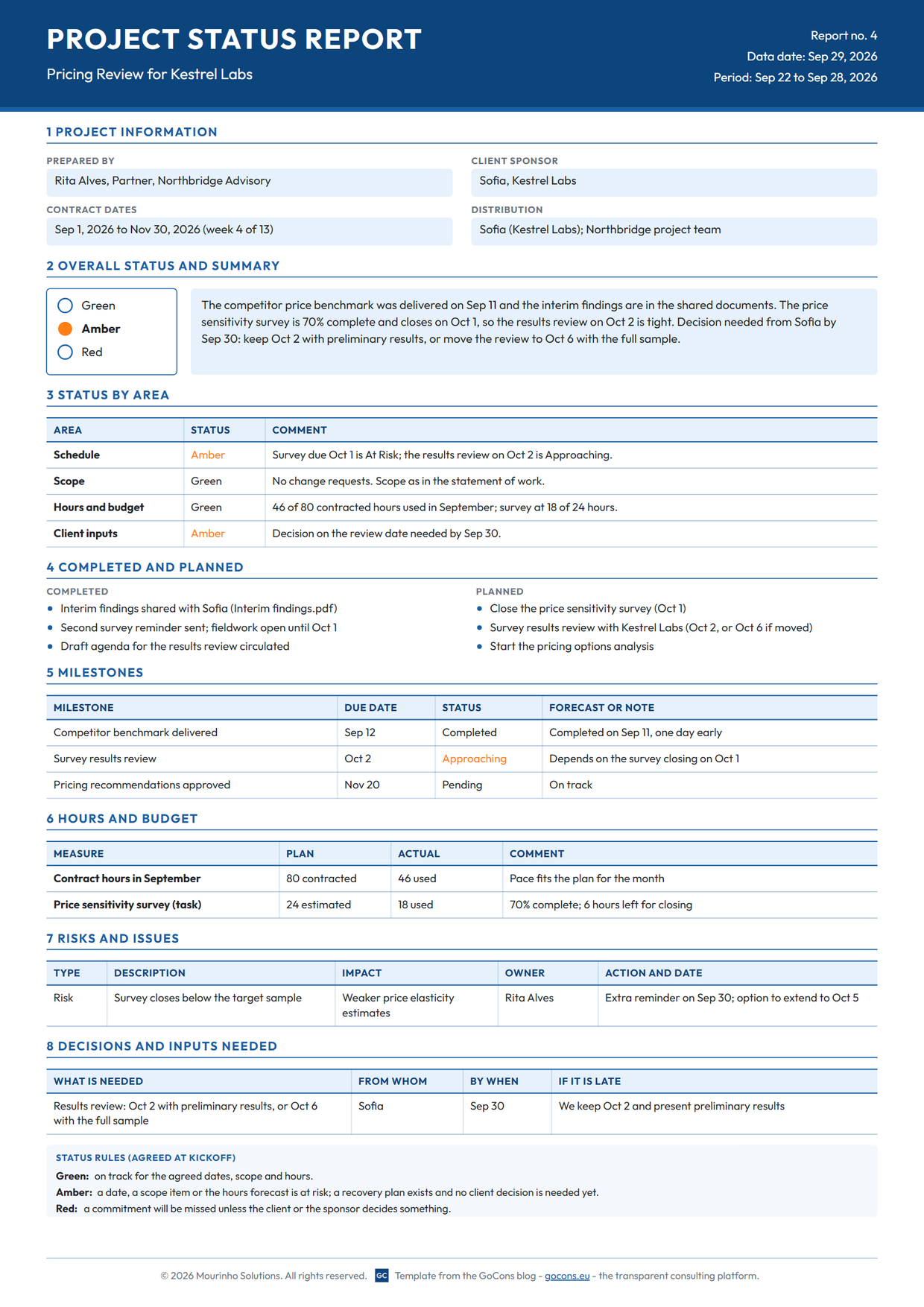
Download the filled-in example (PDF). Three choices make it work:
- The Amber carries its reason in the same line: the price sensitivity survey is 70 percent complete and closes on October 1, one day before the results review.
- The decision is framed as a choice with a default. Sofia, the sponsor, either keeps October 2 with preliminary results or moves the review to October 6 with the full sample. If she has not answered by September 30, October 2 stands.
- Hours are numbers, not adjectives: 46 of 80 contracted hours used in September, 18 of the 24 estimated on the survey.
The weekly routine: update the facts, then write the report
- Update the facts where they live, not in the report: hours on each task, percentage complete, milestone completion dates, new documents.
- Rate each area against the agreed rules. If any area is Red, the overall is Red.
- Fill in milestones, risks and decisions.
- Write the three-sentence summary last, when you know what it has to say.
- Send it, and link to where the detail lives instead of pasting it.
A spreadsheet can carry this routine: one tab per report, with formulas pulling hours from the task list. What it cannot do is show the client the facts between reports, flag a task as at risk as its deadline gets close, or record who changed a contract's dates and when. The report is a copy, and copies go stale.
In GoCons, the status is live and the report becomes commentary
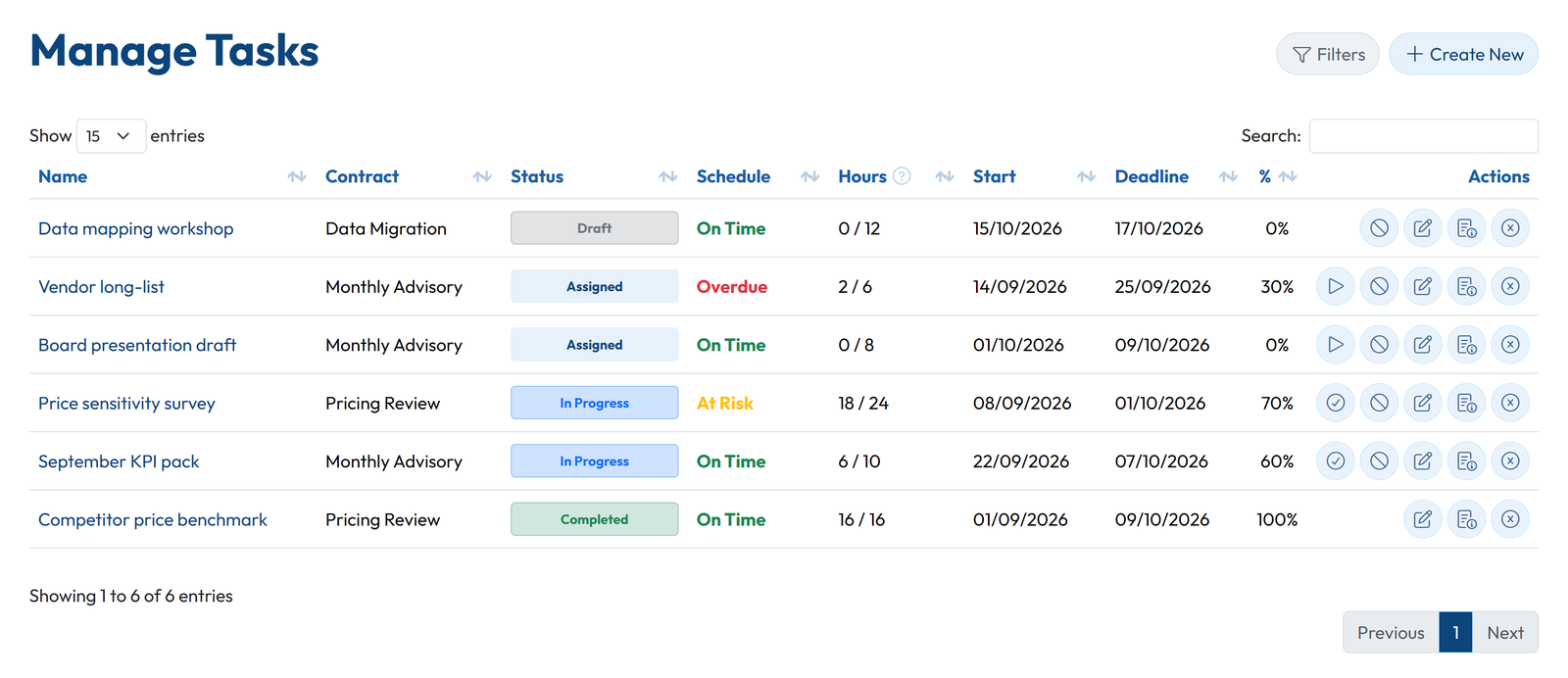
We first built GoCons for our own consulting work at Mourinho Solutions, and this is how it handles status. Each task of a contract carries the hours recorded against its estimate, a percentage complete, a start date and a deadline, and a schedule indicator that reads On Time, At Risk as the deadline gets close, and Overdue once it has passed.
Milestones have their own list, with the status Pending, Approaching (in the week before the deadline), Overdue, or Completed with its completion date.
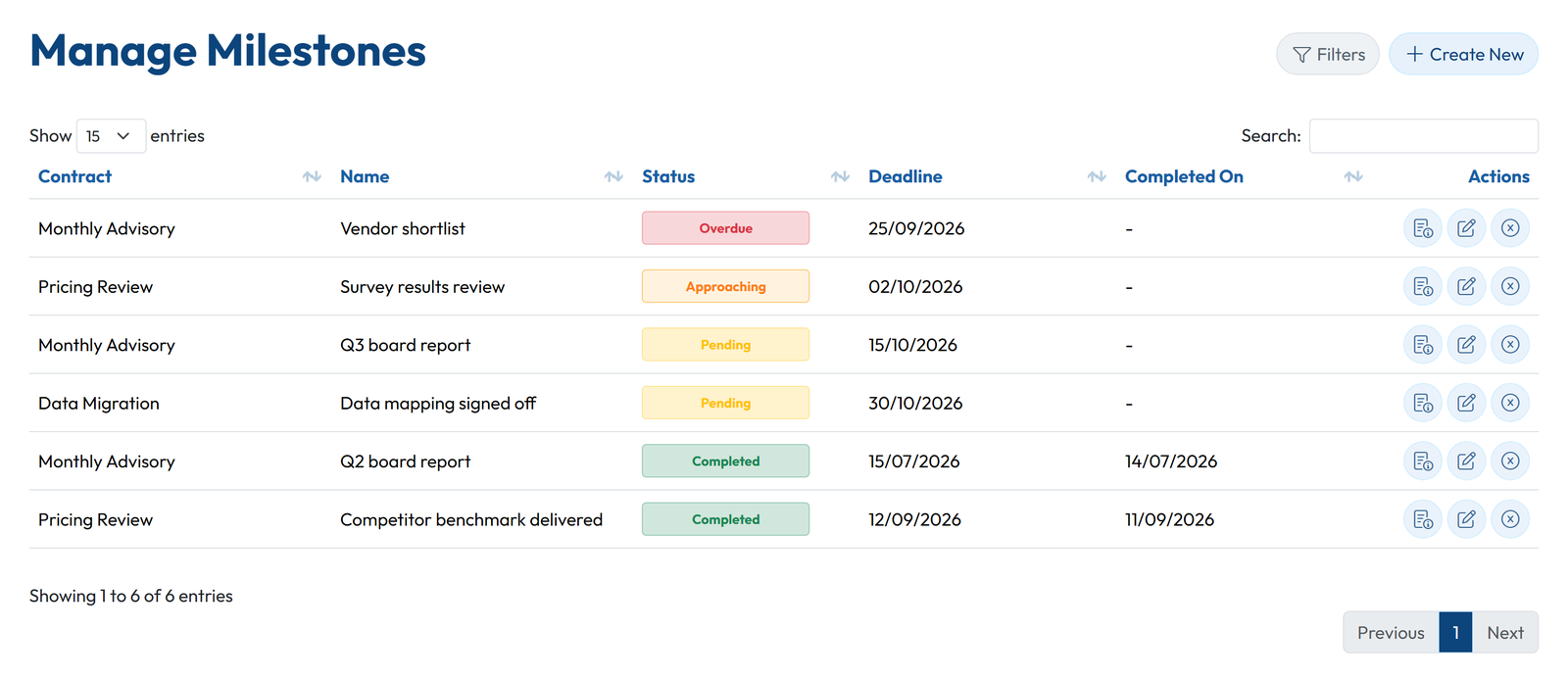
Your client logs in to the same data at no cost and sees the tasks, milestones, hours used against what was contracted and the documents of their contracts. That changes what the weekly report has to carry. The numbers are already in front of the client, so the report shrinks to the overall rating, the three sentences, the decisions you need and the risks, plus a link to the client portal for the rest.
Some clients still want a formal document for a steering committee or for their files, and that is reasonable. Fill in the template from the live screens instead of from three sources, then upload the PDF to the contract's documents, where the client finds it next to the deliverables.
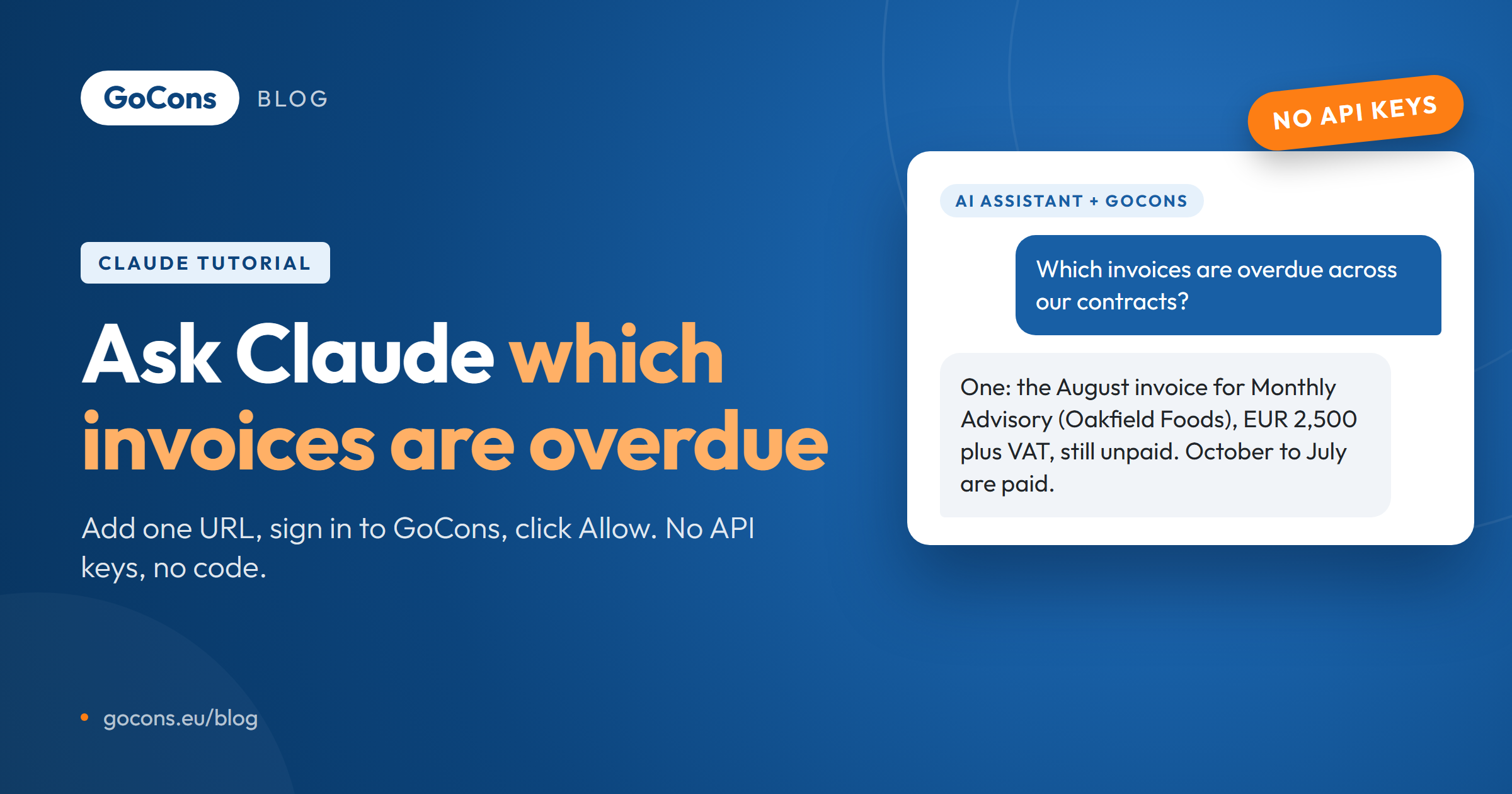
You can also connect Claude or ChatGPT (in developer mode) to GoCons through the GoCons MCP server and ask for a first draft of the summary from the contract's tasks and milestones. You sign in to GoCons and click Allow, with no API keys, and the assistant works within your role. Our guide to connecting Claude to your consulting workspace shows the setup.
FAQ
How often should I send a project status report?
Weekly for projects shorter than three months or in a critical phase, every two weeks for steady longer projects, and monthly for retainers. Agree the day at kickoff and keep it, even in quiet weeks.
Should the client get the same report as my team?
Use the same structure, but keep internal items such as margins and staffing in a separate internal note. Two documents that share the same facts drift apart less than two reports written from scratch.
Do I need an implementation project to run this in GoCons?
No. You create the account, add the contract with its tasks and milestones, and invite the client by email. There is nothing to install; see how it works.
Does my client pay for access, and is GoCons priced per user?
Client users are free and unlimited on every plan and log in from a browser. GoCons is priced per consultancy, not per user, and at the time of writing (October 2026) there is a free plan. Current prices are on the pricing page.
What if I stop using GoCons?
The Admin can download all the consultancy's data at any time, on any plan: one zip with every contract (details, tasks, milestones, billing schedule, history), client and team member as Excel files, plus every document in its folders.
Send your next status report from live data
Create a free GoCons account, add the contract you report on most, enter its tasks and milestones, and invite the client's sponsor. Next Friday, send three sentences and a link instead of rebuilding the page: create your free GoCons account.
References
- Project Management Institute, "Pulse of the Profession In-Depth Report: The High Cost of Low Performance: The Essential Role of Communications" (May 2013), https://www.pmi.org/-/media/pmi/documents/public/pdf/learning/thought-leadership/pulse/the-essential-role-of-communications.pdf (accessed October 2026).
- Project Management Institute, "A Guide to the Project Management Body of Knowledge (PMBOK Guide), Sixth Edition: work performance reports", https://www.pmi.org/standards/pmbok (accessed October 2026).
- Project Management Institute, "PMI Lexicon of Project Management Terms" (data date, risk, issue), https://www.pmi.org/standards/lexicon (accessed October 2026).
- National Infrastructure and Service Transformation Authority (GOV.UK), "NISTA Major Projects Annual Report 2025-26", https://www.gov.uk/government/publications/nista-major-projects-annual-report-2025-26/nista-major-projects-annual-report-2025-26 (accessed October 2026).
- Nielsen Norman Group, "How Users Read on the Web" (Jakob Nielsen, 1997), https://www.nngroup.com/articles/how-users-read-on-the-web/ (accessed October 2026).
© 2026 Mourinho Solutions. All rights reserved.