
Best Client Portal Software: 8 Tools Compared
It is Thursday, twenty to five, and a client emails: "Quick one: where are we on the pricing review, and did you get our purchase order?" The answer exists. It is spread across your task list, a timesheet, a shared drive and two email threads, and stitching it together will take the rest of the afternoon.
That is usually the week a consultancy starts looking for the best client portal software: one place where clients sign in and see their own contracts, progress, documents and invoices without having to ask. The trouble is that many of those lists are written for photographers, coaches or large agencies. This one is written for consulting firms of 2 to 30 people running 5 to 60 client contracts at a time.
Disclosure: I founded Mourinho Solutions, the company behind GoCons. I have tried to be fair, and I say where each tool beats ours.
How I compared these client portals
I have sat on both sides of this table. As a technology consultant in Brazil and Portugal, I was the one writing the status updates. At SISTRADE, where I was Director of Innovation, and later at UNICEF, I was the client buying consulting and software, and the suppliers I trusted most were the ones whose progress I never had to chase. We then built GoCons for our own consulting projects before opening it to other firms, which taught me which details matter after the demo.
So I compared every tool on five questions:
- What does the client see without asking? Status, hours used against what was contracted, upcoming milestones, documents and invoices.
- What does a client login cost you? Some tools charge per seat, some cap "active contacts", some include clients for free.
- How deep do contracts and billing go? Retainers, renewals, notice periods, and which invoice covers which period.
- Can it carry your brand and the conversation? White-labeling, custom domains, chat, e-signatures and card payments.
- How hard is it to start, and to leave? Whether you need an implementation project, and whether you can take your data with you.
Prices are list prices from each vendor's own pricing page at the time of writing (October 2026), in the currency the vendor shows and excluding VAT. Ratings are from Capterra on the same date. Both change often, so check the sources at the end before you buy.
Best client portal software at a glance
| Tool | Best for | Entry price with a client portal | How it is priced | Free plan or trial |
|---|---|---|---|---|
| GoCons | Consultancies that run work on contracts and retainers | Free; Silver EUR 29/month | Per consultancy; client logins free and unlimited | Free plan (10 active contracts) |
| Assembly (formerly Copilot) | A branded portal plus custom client apps | Free; Starter $49/month ($29 billed yearly) | Per plan, capped by active contacts and internal users | Free plan (5 active contacts) |
| SuiteDash | A white-labeled all-in-one | $19/month | Flat per plan; unlimited staff and clients | 14-day trial, no card |
| Clinked | Secure, document-heavy client work | Start Up $11 per user/month | Per user, or flat with members included | 14-day trial |
| Moxo | Multi-step client workflows in larger firms | Team $5,000/year | Flat per year; unlimited seats | Trial on request |
| FuseBase | Portals that double as knowledge hubs, with AI | Solo $39/month | Per plan; extra members paid | Free plan (1 portal), 14-day trial |
| Bonsai | Solo consultants who want proposal to payment in one tool | Essentials $25 per user/month | Per user | 7-day trial |
| Plutio | Freelancers and small teams who want a flat all-in-one | Core $19/month | Flat per plan | 7-day trial, no card |
The 8 client portal tools, one by one
1. GoCons: the contract-first portal for consultancies
GoCons is the tool we build, so weigh this entry accordingly. It starts from the contract, not the conversation: each contract has one of nine contract types, its dates, billing terms and a status that moves from Prospect to Active, Renewed or Terminated. Tasks, milestones, documents and a billing schedule hang off that contract, and the client portal shows each client their own slice of it.
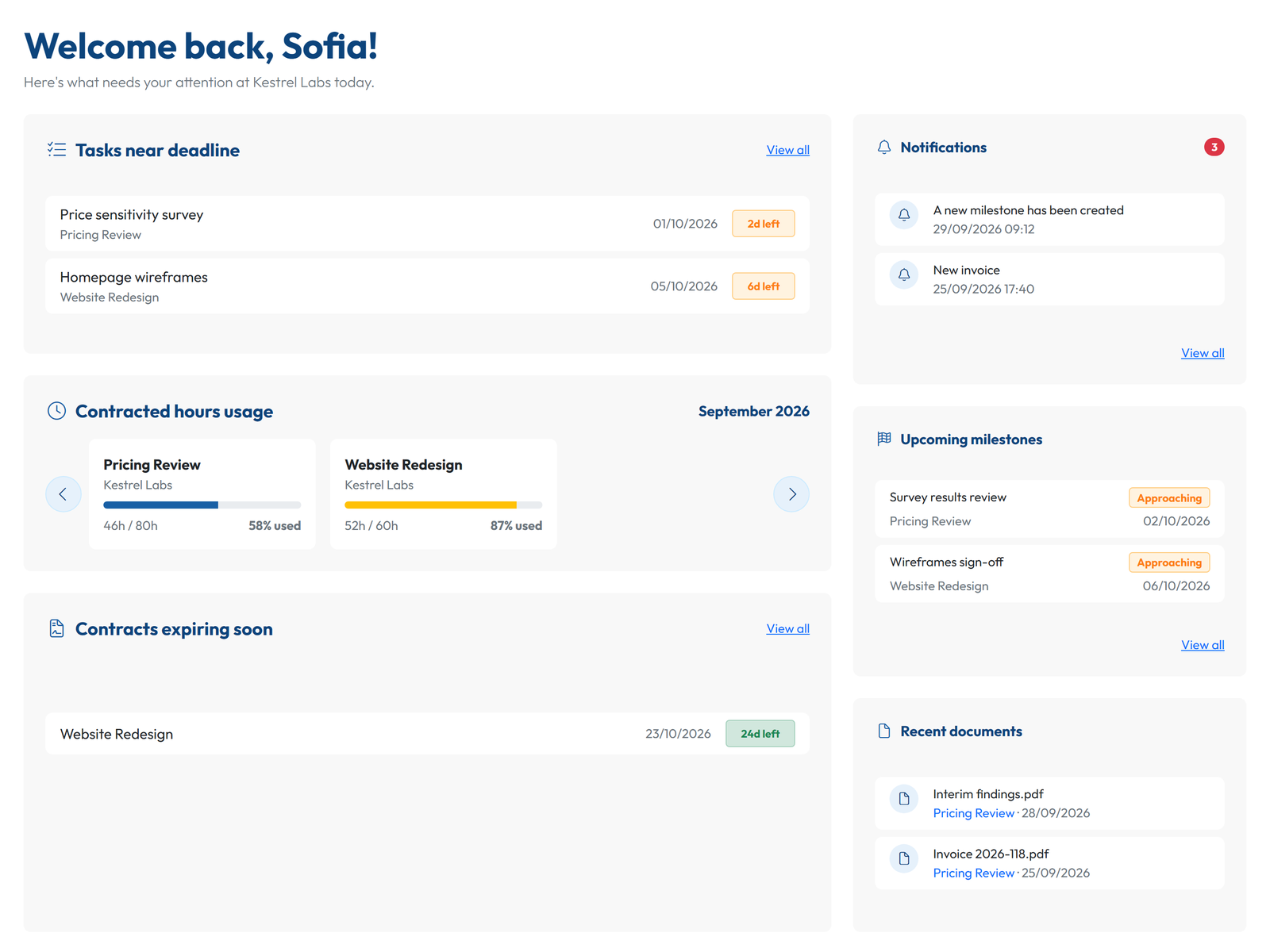
Where it wins: client logins are free and unlimited on every plan, including Free, and pricing is per consultancy rather than per user. Its ultimate simplicity hides powerful features such as the automated workflows, support for multiple contract types, and a MCP server so you can use it intelligently from ChatGPT or Claude. And it provides enterprise features for larger consultancies such as API and Single Sign-on. Every paid plan offers simple export to QuickBooks and Xero. Watch out for: it does not issue invoices or take card payments, so you need to use your invoicing app - which is not a disadvantage on geographies that require local certified invoicing apps.
2. Assembly (formerly Copilot): a branded portal with an AI app builder
Copilot renamed itself Assembly in September 2025, partly because, with Microsoft and GitHub using the same name, recommendations had become impossible to find [1]. It targets professional service firms, consulting firms included. Every workspace gets a branded client experience where clients sign in with magic links or Google, with multi-factor authentication on top, plus a CRM, messaging, billing and payments, and an app builder that turns a plain-language description into client-facing apps such as onboarding wizards or document collectors [2].
Pricing [3]: Free covers 5 active contacts and 1 internal user; Starter is $49 a month ($29 billed yearly) for 50 contacts; Professional is $139 ($99 yearly) for 500 contacts, 3 internal users and custom domains; Advanced is $599 ($499 yearly) for unlimited contacts and 5 internal users. Active contacts are the client records who can sign in, and payment processing fees apply when you collect money through it. Capterra: 4.8 out of 5 from 35 reviews [4].
Beats GoCons on: branding (custom domains from Professional), payments collected inside the portal, messaging and custom client apps. Choose it if you like the idea of building small apps for clients. Watch out for the two limits per tier (client contacts and internal users): check both against your team.
3. SuiteDash: white-labeled all-in-one at a flat price
SuiteDash costs $19, $49 or $99 a month ($180, $480 or $960 a year), and every plan includes unlimited clients and staff and custom branded mobile app [5]. Across its plans, it adds a CRM, invoicing with online payments, contracts with e-signature, projects and tasks and file sharing, with proposals arriving on THRIVE and support tickets and a learning management system on PINNACLE. The 14-day trial runs on the top plan and needs no card, but there is no free tier.
On price per feature, it is the strongest tool on this list. The cost is setup: Capterra reviewers (4.8 out of 5 from 633 reviews) praise how much it replaces, and the most common complaints are a steep learning curve and slow load times [6].
Beats GoCons on: has a branded mobile app, proposals, payments and messaging. Choose it if you you are ready to invest time in setting it up.
4. Clinked: a secure document portal for regulated work
Clinked is built around files and access control. Start Up costs $11 per user a month for up to 25 users; Standard is $239 a month with 100 members, 1 TB, an audit trail and your own domain; Premium is $599 with 250 members, enforced two-factor authentication and role-based permissions; Enterprise adds single sign-on and a choice of US, EU or rest-of-world data centers [7]. Its member types cover employees, clients, partners and other external stakeholders [8], so ask how your client users count toward the members included before you choose a plan. There is a 14-day trial [9].
Capterra reviewers mention limited integrations and a business-like look [10].
Beats GoCons on: document control and security options (audit trail, enforced two-factor authentication, data center choice), chat and a mobile app. Choose it if your work is document-heavy and sensitive (finance, legal, transactions, public sector) and file control matters more than contracts or billing.
5. Moxo: client workflows for larger firms
Moxo organizes client work as guided, multi-step flows: approvals, forms, e-signatures, file requests and payments, with clients joining through magic links and email or SMS notifications. The Team plan costs $5,000 a year with unlimited seats and 100 flows a year; the portal pages with a custom domain, SAML single sign-on and the audit log sit on the Scale plan, priced by quote [11].
Capterra reviewers (4.0 out of 5 from 24 reviews) mention a learning curve and the effort of getting clients to use it instead of email [12].
Beats GoCons on: guided multi-step processes with approvals, e-signatures, file requests and payments. Choose it if you run the same structured client process many times a month, onboarding or document collection for example, and have the budget.
6. FuseBase: portals as client knowledge hubs, with AI
FuseBase combines client portals with internal docs, task boards, chat, AI agents and automation. Solo costs $39 a month ($32 billed yearly) for 1 member and 1 portal; Essentials is $99 ($82 yearly) for 5 members, 10 portals and 100 clients; white label with a custom domain starts at Advanced, $399 a month ($266 yearly) [13]. A free plan keeps 1 client portal after the 14-day trial.
Capterra reviews complain about occasional bugs and syncing delays [14].
Beats GoCons on: collaborative documents, chat, AI agents. Choose it if your deliverables are living documents, such as playbooks, SOPs or knowledge bases, that clients consult and edit with you.
7. Bonsai: proposal to payment for solo consultants
Bonsai covers the commercial cycle: proposals, contracts with signatures, time tracking, invoices and online payments. The client portal starts on Essentials at $25 per user a month ($19 billed yearly); client tasks and messaging, removing Bonsai branding and the QuickBooks and Xero integrations need Premium at $39 ($29 yearly) [15]. Its pricing page lists white-label branding and a custom domain as expected in 2026, and it now offers an MCP connection for Claude, ChatGPT and Gemini. The trial lasts 7 days.
Capterra: 4.6 out of 5 from 95 reviews; the common complaint is that pricing climbs as you add teammates [16].
Beats GoCons on: proposals, e-signed contracts, time tracking, issuing invoices and taking payments. Choose it if you work alone or with one or two associates and want the portal in the same tool as proposals, time and invoices.
8. Plutio: a flat-priced all-in-one with a white-label option
Every Plutio plan includes projects, proposals, contracts with e-signatures, invoices with Stripe, PayPal or Square, time tracking, scheduling, forms and a client portal where clients log in to see projects, invoices, files and messages. Core costs $19 a month but allows 9 active clients and no team; Pro, $49, removes the client cap and includes 30 contributors; Max, $199, includes white-label and single sign-on; white-label is an add-on on Core and Pro, and single sign-on an add-on on Pro. Yearly billing saves about two months, and the 7-day trial needs no card [17].
Capterra: 4.6 out of 5 from 162 reviews; reviewers like the value and mention bugs and uneven support [18].
Beats GoCons on: e-signatures. Choose it if you are a freelancer or a small team who wants everything in one flat-priced tool, with a branded portal later.
Also considered
HoneyBook includes a client portal on every plan, but at the time of writing it only serves businesses in the US, Canada, the UK and Australia [19]. Dubsado includes client portals on both plans ($335 and $525 a year) and suits service businesses built around bookings and forms [20]. Zoho Projects is a strong project tool, but client users are a paid add-on from $4 per client user a month billed yearly [21]. Teamwork.com gives free client users on its paid plans, each limited to five active projects [22].
Where GoCons fits a consultancy better, and where it does not
Most portals on this list start from the client relationship: messages, files, payments. GoCons starts from the agreement, which is what a consultancy's questions are usually about. Seven specifics:
- The contract runs itself. In Automated mode the status follows the contract dates, and a renewable contract renews on its own and shows "Renewed". Renewal dates and notice periods live on the contract, not in a PDF, and every status or date change is written to the history with who and when.
- Retainer hours are visible. A retainer carries its monthly amount and included hours, and the client sees hours used against what was contracted, before month end rather than after.
- Money has a schedule. Each contract gets a billing schedule generated from its dates and frequency, with reminders before each line is due and alerts when one is overdue. You attach the invoice your accounting software issued, and Silver and Gold export invoices as CSV for QuickBooks Online or Xero.
- The price does not grow with your client list. At the time of writing, Free costs EUR 0 with 2 team users and 10 active contracts, Silver EUR 29 a month (GBP 25, USD 34) with 10 team users, and Gold EUR 69 (GBP 59, USD 79) with 30 users and Microsoft Entra ID single sign-on (current prices). Clients never count.
- Just connect ChatGPT or Claude to it and unleash intelligent interaction to ask questions, generate reports, get status updates in no time
- Contract Flexibility and Automation. An automated workflow takes you throughout contract execution safely. You can set it to manual, nevertheless.
- No Lock-in. GoCons is the transparent consulting platform and consultancies can just download all their data with a click, at any time.
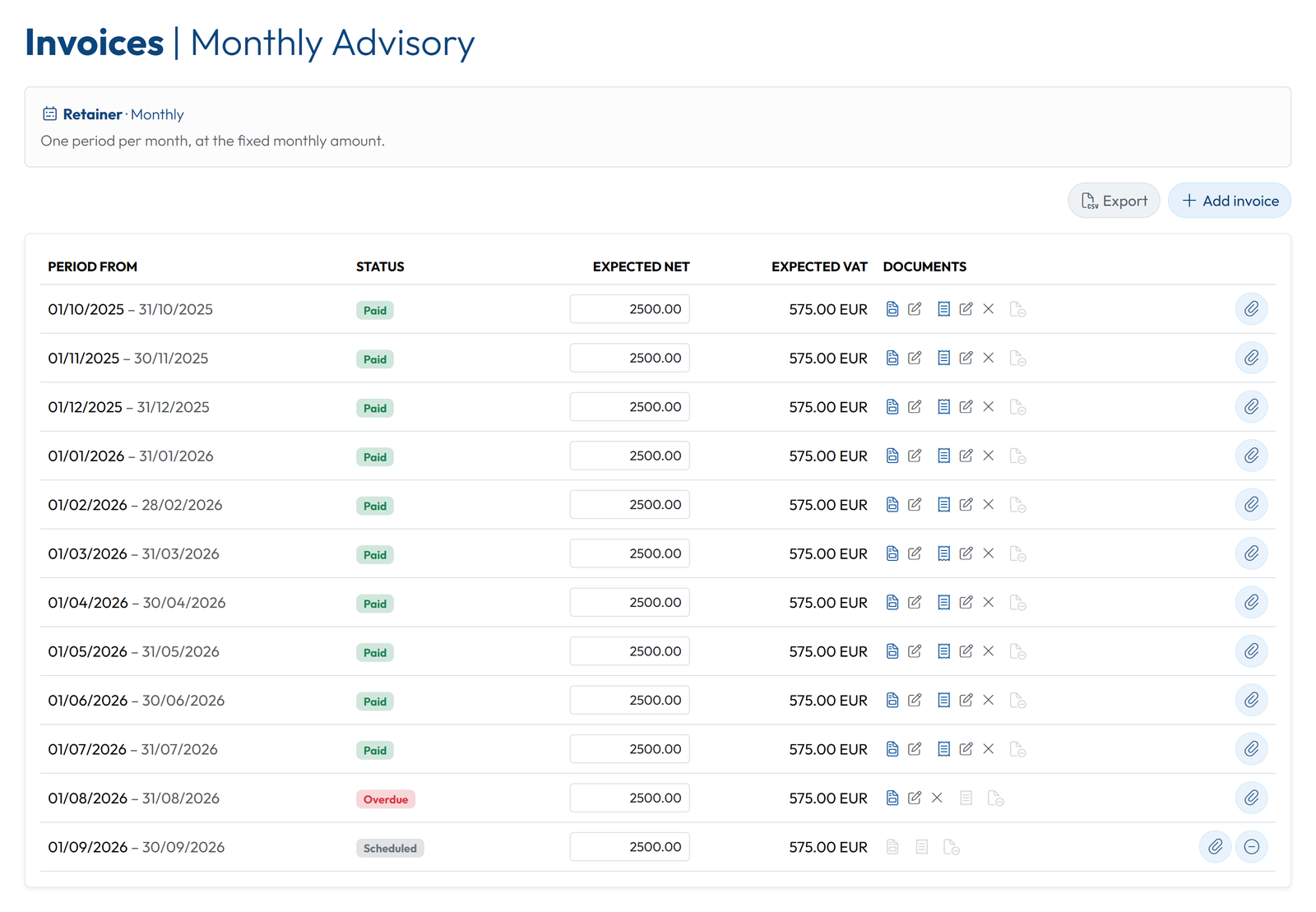
Two smaller points matter to European firms: the interface comes in 21 languages, with emails reaching each recipient in their own, and the Admin can download all the data at any time, on any plan, as Excel files for every contract, client and team member plus every document in its folders. Separately, GoCons connects to Claude and ChatGPT (in developer mode) through its MCP server, with OAuth sign-in instead of API keys, on every plan.
Where GoCons may not be the best choice: if you need chat inside the portal or need e-signature.
How to choose in 30 minutes
- Write down the three questions your clients ask most often. "Where are we?" and "what do we owe?" point to a contract-first portal; "can you send me the file again?" points to a document portal; "how do I pay?" points to a portal with payments.
- Count the people who will sign in on both sides, then price each shortlisted tool for that team and that number of client contacts, monthly and yearly.
- List the deal-breakers: your own domain, single sign-on, EU data hosting, a mobile app, payments.
- Put one real client in a trial or free plan for two weeks, and ask that client what they found and what they missed.
FAQ
What is the best client portal software for a small consulting firm?
I may be biased here. But if you care about contract flexibility, automation, simplicity and intelligence, you will be well served with GoCons. And it offers a generous free tier and no lock-in. You have nothing to loose in trying it.
Do clients pay to use a client portal?
No, in none of these tools. The real question is what you pay for each client login: GoCons includes unlimited clients, Assembly and FuseBase cap clients per plan, and Clinked counts members.
Do I need an implementation project?
Not with GoCons: create the account, add a contract and invite the client, who signs in from the browser at no cost. It is very simple and intuitive. So you can focus on growing your business.
What happens to my data if I leave?
In GoCons, the Admin can download every contract, client and team member as Excel files plus every document, on any plan, including Free. For any other tool, ask how documents and records are exported before you commit.
Start with one client this week
The fastest way to judge a client portal is to put one real contract in it. Add a retainer or a project with its dates and billing terms, invite that client, and see whether the "where are we?" emails stop. No card, no implementation project, and your client signs in for free: create your free GoCons account.
References
- Assembly, "Meet Assembly - the AI-powered platform for professional service firms", https://assembly.com/blog/copilot-rebrand-assembly (accessed October 2026).
- Assembly, "The platform firms run on and build on", https://assembly.com/ (accessed October 2026).
- Assembly, "Pricing", https://assembly.com/pricing (accessed October 2026).
- Capterra, "Assembly Software Pricing, Alternatives & More 2026", https://www.capterra.com/p/214210/Assembly/ (accessed October 2026).
- SuiteDash, "Pricing", https://suitedash.com/pricing/ (accessed October 2026).
- Capterra, "SuiteDash Software Pricing, Alternatives & More 2026", https://www.capterra.com/p/154949/SuiteDash/ (accessed October 2026).
- Clinked, "Plans & Pricing", https://www.clinked.com/pricing (accessed October 2026).
- Clinked, "Member Types", https://www.clinked.com/features/member-types (accessed October 2026).
- Clinked, "Free Client Portal Software: Avoid risks and What to Look For Before You Choose", https://www.clinked.com/blog/free-client-portal-software-what-to-look-for-and-what-to-avoid (accessed October 2026).
- Capterra, "Clinked Software Pricing, Alternatives & More 2026", https://www.capterra.com/p/169648/Clinked/ (accessed October 2026).
- Moxo, "Pricing", https://www.moxo.com/pricing (accessed October 2026).
- Capterra, "Moxo Software Pricing, Alternatives & More 2026", https://www.capterra.com/p/133812/Moxo/ (accessed October 2026).
- FuseBase, "Pricing", https://thefusebase.com/pricing/ (accessed October 2026).
- Capterra, "Fusebase Software Pricing, Alternatives & More 2026", https://www.capterra.com/p/147496/Nimbus-Note/ (accessed October 2026).
- Bonsai, "Pricing", https://www.hellobonsai.com/pricing (accessed October 2026).
- Capterra, "Bonsai Software Pricing, Alternatives & More 2026", https://www.capterra.com/p/238825/Bonsai/ (accessed October 2026).
- Plutio, "Pricing", https://www.plutio.com/pricing (accessed October 2026).
- Capterra, "Plutio Software Pricing, Alternatives & More 2026", https://www.capterra.com/p/179406/Plutio/ (accessed October 2026).
- HoneyBook, "Pricing", https://www.honeybook.com/pricing (accessed October 2026).
- Dubsado, "Pricing", https://www.dubsado.com/pricing (accessed October 2026).
- Zoho, "Zoho Projects Pricing plans and Features", https://www.zoho.com/projects/pricing-comparison.html (accessed October 2026).
- Teamwork.com, "Teamwork.com User License Types", https://support.teamwork.com/projects/people/license-types (accessed October 2026).
© 2026 Mourinho Solutions. All rights reserved.