A software vendor's newsletter announces that "our MCP server is live", and by lunchtime someone on your team asks whether they can connect it to ChatGPT. The partner who signs off on tools wants three answers: what it is, what it can see, and whether it can change anything. The vendor's documentation answers in JSON.
This guide gives the same answers in plain English: what is MCP, what an MCP server does, what actually happens when an assistant uses one, and which checks to run before you let it near client data. It ends with the places where it earns its keep in a consultancy.
What is MCP? The short answer
MCP, the Model Context Protocol, is "an open-source standard for connecting AI applications to external systems" [1]. The official site compares it to a USB-C port: one standard plug instead of a different cable for every device [1]. Before it, every AI application needed its own custom integration with every tool; Anthropic described those fragmented integrations as hard to scale when it introduced the protocol in November 2024 [2].
It is no longer one company's project. OpenAI announced support in March 2025 [3], and in December 2025 Anthropic donated MCP to the Agentic AI Foundation, a fund under the Linux Foundation co-founded by Anthropic, Block and OpenAI. By then ChatGPT, Cursor, Gemini, Microsoft Copilot and Visual Studio Code all supported it, and more than 10,000 public MCP servers were active [4].
So what is an MCP server?
The documentation defines an MCP server as "a program that provides context to MCP clients" [5]. In business terms, it is the part of a software product that tells an AI assistant: here is what you can look up and do in this system, and here is how to ask. Every connection has three roles [5]:
| Role | In plain English | Example |
|---|---|---|
| MCP host | The AI application you type into | Claude, ChatGPT, Visual Studio Code |
| MCP client | The connector inside that application, one per server | The GoCons connector you add in Claude |
| MCP server | The service that publishes tools and runs them | GoCons at gocons.eu/mcp |
A server can offer three kinds of things [5]: tools, actions the model can call, such as "search invoices" or "record task progress"; resources, data such as a file or a database record; and prompts, reusable templates. The business servers you will meet are mostly tools.
Servers also come in two shapes [5]. A local server runs on your own computer, which suits files and developer tools. A remote server is hosted by the vendor and reached over the internet. For business software, remote is the usual case: you add a web address in your assistant, sign in, and that is the whole installation.
What happens when you ask a question
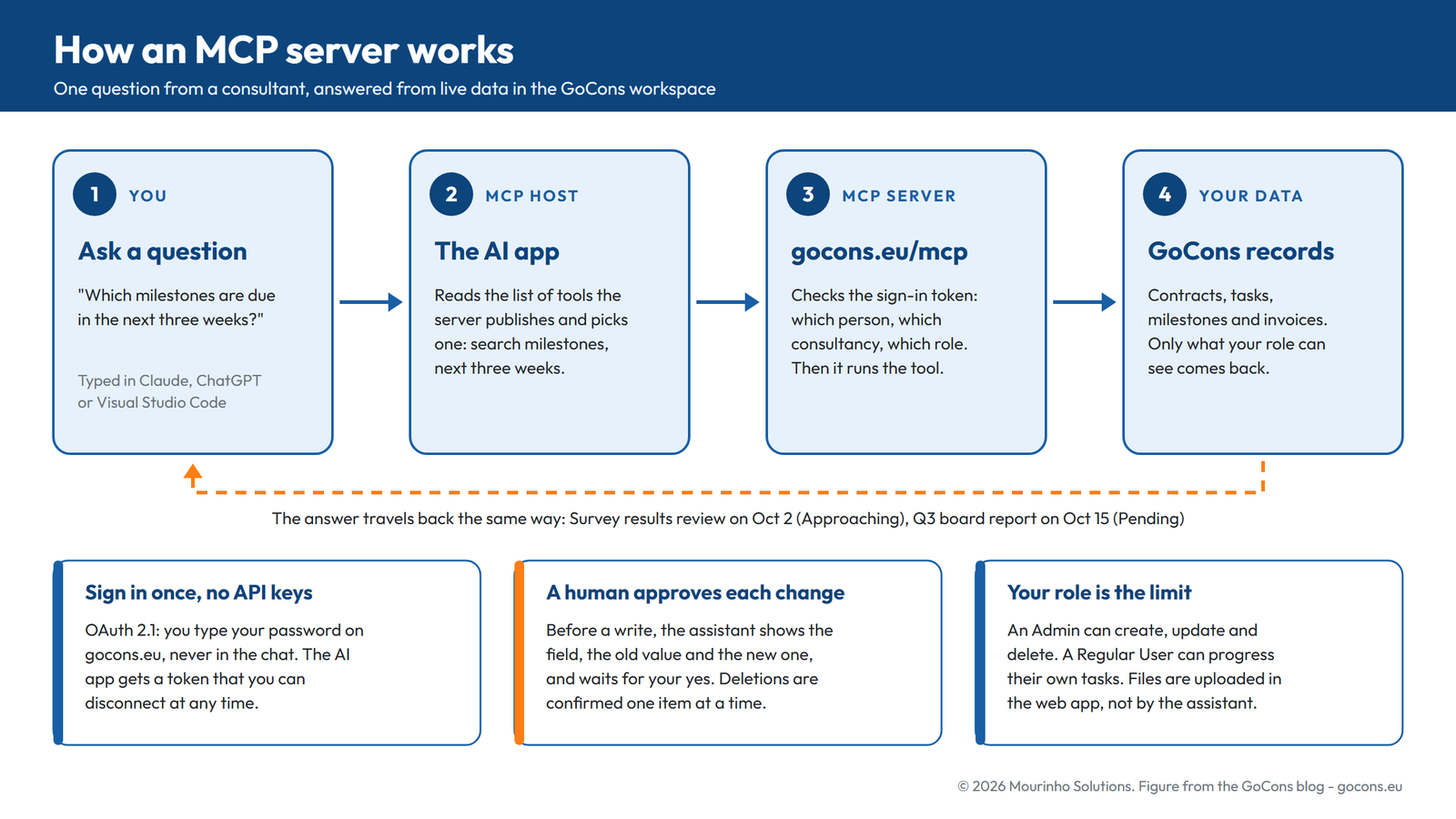
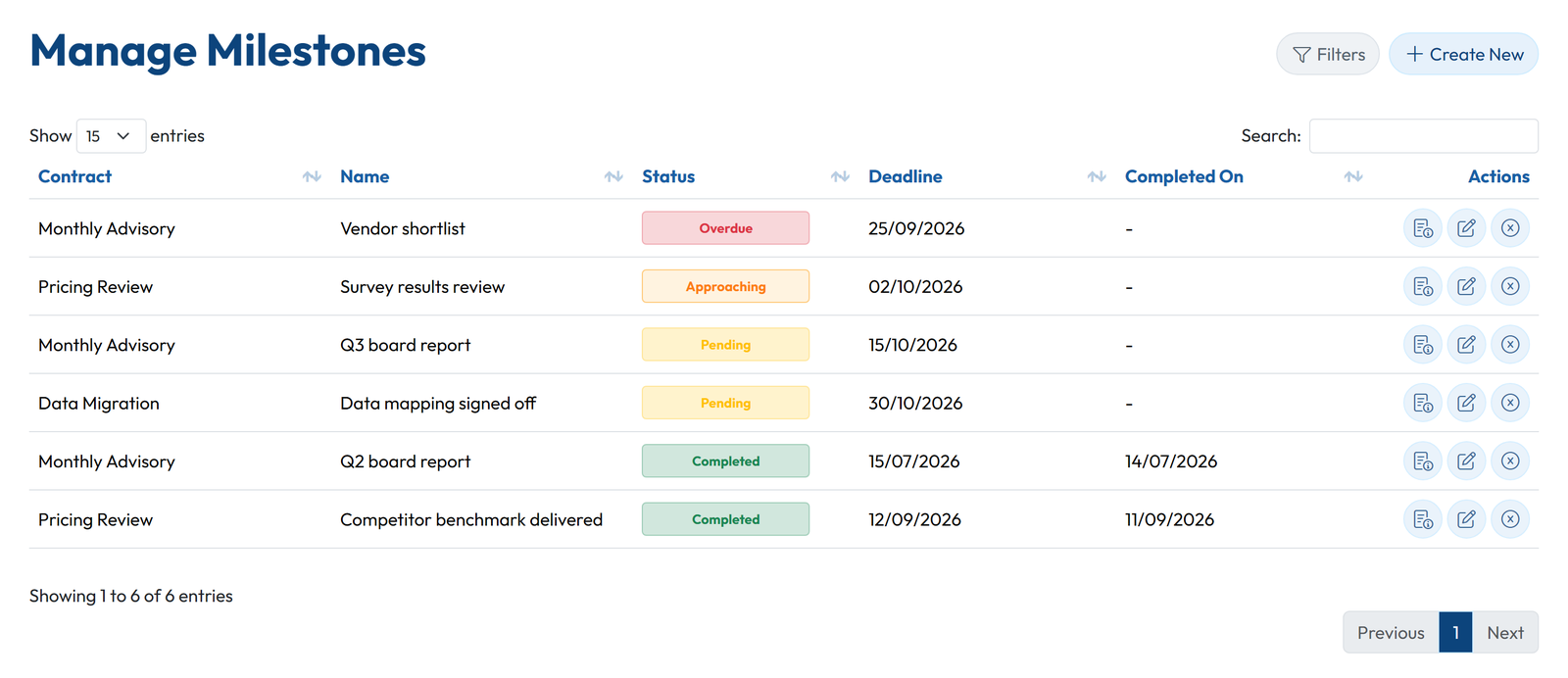
Here is one sequence from start to finish. The workspace belongs to a fictional consultancy, Northbridge Advisory, and lives in GoCons, the contract and project software we build at Mourinho Solutions. The date is September 29, 2026.
You ask: Which milestones are due in the next three weeks?
Claude answers: Two. Survey results review on Pricing Review (Kestrel Labs) is due October 2 and marked Approaching. Q3 board report on Monthly Advisory (Oakfield Foods) is due October 15 and still Pending. One more is already late: Vendor shortlist, also on Monthly Advisory, was due September 25.
Behind that answer:
- When the connection opened, Claude asked the server for its list of tools, each with a name, a description and the inputs it accepts [5].
- Claude chose the milestone search tool and filled in the dates.
- The GoCons server checked the sign-in token: which person, which consultancy, which role.
- It ran the search inside that consultancy only and returned the matching milestones.
- Claude turned the result into the sentences above. Nothing was copied in advance, and nothing else was shared.
MCP server vs API: what is the difference?
The question IT usually asks next is how this differs from the API the vendor already has. Both reach the same data, for different users.
| API | MCP server | |
|---|---|---|
| Built for | Programs a developer writes | AI assistants anyone can use |
| How you use it | Code calls documented endpoints | You ask in plain language and the assistant picks the tool |
| Typical job | A nightly sync with your CRM or reporting dashboard | "What is overdue?" or "log two hours on this task" |
| Sign-in | A key or token stored in the code | Usually OAuth: you sign in and approve in the browser |
| In GoCons | REST API on Silver and Gold | MCP server on every plan |
They complement each other. A job that must run every night with nobody watching belongs on the API, and the GoCons API page shows what that covers. A question someone asks once, or a change someone wants to confirm, belongs in an assistant. Integrations built for one AI product had to be rebuilt for the next; an MCP server is built once and works with every host that speaks the protocol [1].
Five checks before you connect an MCP server
- Who runs it? A connector you add by its URL links your assistant to a service nobody has vetted for you. Anthropic's advice is to connect only to servers from trusted organizations [6].
- How do you sign in? For remote servers, the MCP specification bases authorization on OAuth 2.1 [7]: you sign in on the vendor's own site and approve, and the assistant gets a token instead of your password. Being asked to paste a password or a permanent key into a chat is a red flag.
- What can it change? Read-only access is low risk. If the server can create, update or delete, check that it follows the roles you already use in the application.
- Is a human in the loop? The specification says there "SHOULD always be a human in the loop with the ability to deny tool invocations" [8]. Claude can ask for your approval before each tool call, with permissions you set tool by tool, and ChatGPT asks for confirmation before write actions depending on the app's permissions [6][9].
- Can you revoke it? You should be able to disconnect from the assistant and from the vendor's side, device by device.
Prompt injection deserves its own sentence: text hidden in a document, web page or email can try to give the assistant instructions. Requiring approval for writes and connecting only the servers you need are the practical defenses [6].
For the record, this is how GoCons answers the five checks. Sign-in is OAuth 2.1, with no API keys. What the assistant can do follows your role: an Admin can create, update and delete, a Regular User can progress the tasks assigned to them. GoCons tells the assistant to confirm every change and to name each item before deleting it. Files are uploaded in the web app, never through the assistant. And every connection appears in My Profile under Connected apps, where it can be disconnected on its own.
Where an MCP server earns its place in a consultancy
When I taught operations research at the University of Porto, the useful question about any model was which decision it changes. For an MCP server in a consultancy, the decisions are small and frequent:
- Monday triage. "What is overdue across all contracts: tasks, milestones and invoices?" One question instead of three screens.
- Client updates. "Draft a status note for Kestrel Labs from this week's progress", written from live data, then edited by you.
- Billing follow-up. "Which invoices are unpaid?", followed by "mark the August invoice for Oakfield Foods as paid today", confirmed before it happens.
- Renewals. "Which renewable contracts end in the next 90 days, and what notice period does each have?"
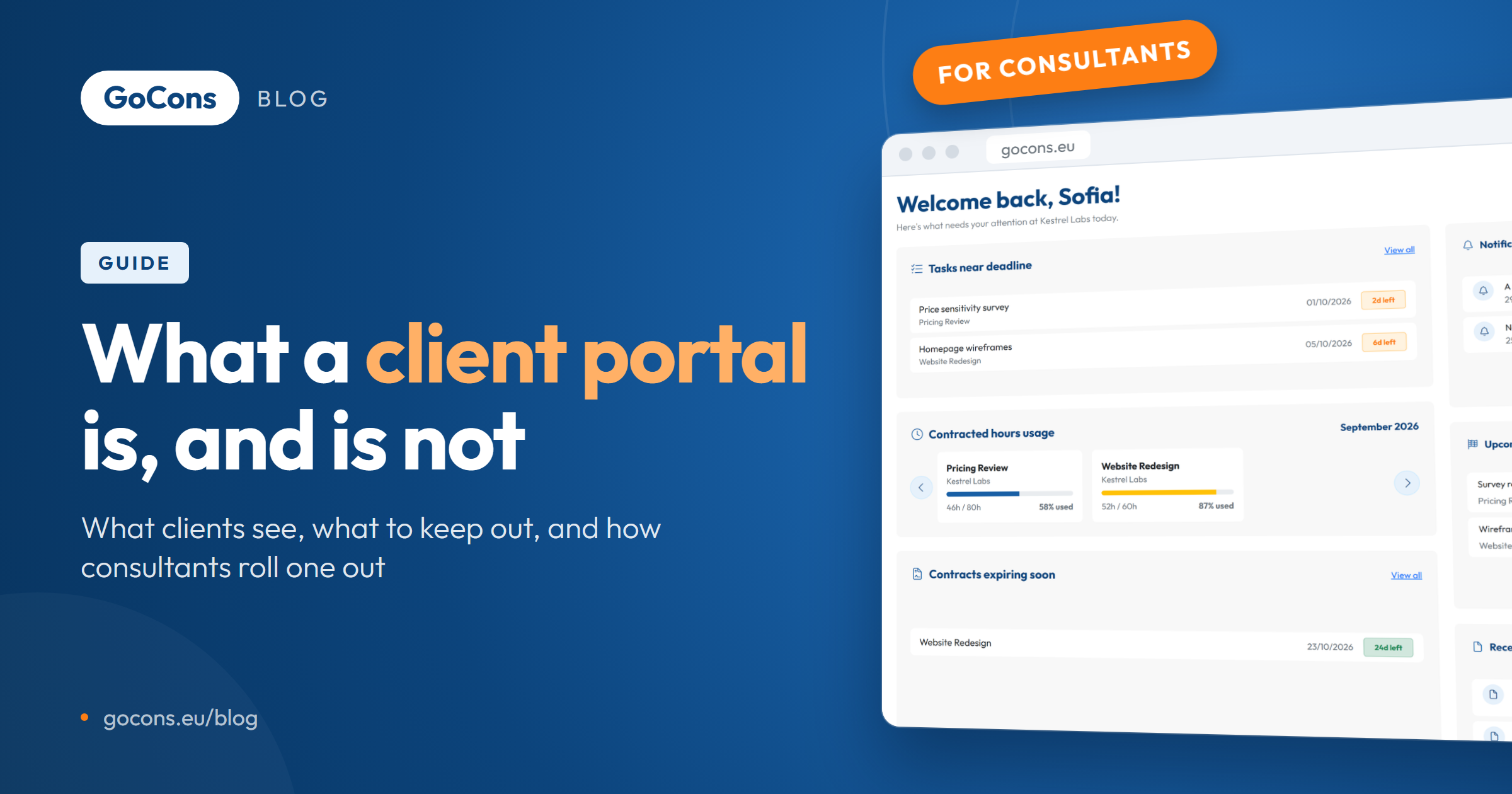
It does not replace the screens your clients use: in GoCons they follow their contracts, milestones and documents in the client portal, and the assistant is a tool for your team. To try it, our guide to connecting Claude with MCP walks through each click, and the GoCons MCP page covers ChatGPT and Visual Studio Code.
FAQ
Is an MCP server the same as an AI model?
No. The model (Claude, GPT and others) does the reasoning; the MCP server publishes tools and runs them. You can switch assistants and keep the same server.
Does an MCP server give the AI my whole database?
No. It exposes specific tools, and each call returns only what that tool returns for your account and role. Nothing is copied to the assistant in advance.
Do I need a developer to use one?
Not for a remote server with OAuth sign-in: you add the address in your assistant, sign in and approve. Building an MCP server is developer work; using one is not.
What does an MCP server cost?
The protocol is open and free, and each vendor sets its own pricing. GoCons includes its MCP server in every plan, priced per consultancy rather than per user, with 500 calls a month on Free, 10,000 on Silver and 100,000 on Gold at the time of writing (October 2026). The pricing page has the current figures.
What if we stop using the software?
Disconnect the assistant, then export your data. In GoCons the Admin can use Download my data on any plan, Free included, to get every contract, client and team member as Excel files plus every document in its folders.
See an MCP server work on your own contracts
Reading about MCP only goes so far; asking an assistant about your own work makes it concrete. Create a free GoCons account, add a contract, and connect the assistant you already use.
References
- Model Context Protocol, "What is the Model Context Protocol (MCP)?", https://modelcontextprotocol.io/docs/getting-started/intro (accessed October 2026).
- Anthropic, "Introducing the Model Context Protocol", https://www.anthropic.com/news/model-context-protocol (accessed October 2026).
- TechCrunch, "OpenAI adopts rival Anthropic's standard for connecting AI models to data", https://techcrunch.com/2025/03/26/openai-adopts-rival-anthropics-standard-for-connecting-ai-models-to-data/ (accessed October 2026).
- Anthropic, "Donating the Model Context Protocol and establishing the Agentic AI Foundation", https://www.anthropic.com/news/donating-the-model-context-protocol-and-establishing-of-the-agentic-ai-foundation (accessed October 2026).
- Model Context Protocol, "Architecture overview", https://modelcontextprotocol.io/docs/learn/architecture (accessed October 2026).
- Anthropic, "Add a connector that isn't in the directory", Claude documentation, https://claude.com/docs/connectors/custom/add-unlisted (accessed October 2026).
- Model Context Protocol, "Authorization", MCP specification, https://modelcontextprotocol.io/specification/latest/basic/authorization (accessed October 2026).
- Model Context Protocol, "Tools", MCP specification, https://modelcontextprotocol.io/specification/latest/server/tools (accessed October 2026).
- OpenAI, "Developer mode and MCP apps in ChatGPT", OpenAI Help Center, https://help.openai.com/en/articles/12584461-developer-mode-and-mcp-apps-in-chatgpt-beta (accessed October 2026).
© 2026 Mourinho Solutions. All rights reserved.